How to Play Windows 8 Sudoku Game - Sudoku Game Tips for Beginners
Microsoft offers Windows users free Sudoku puzzles with Windows 8 Sudoku game in the latest Windows operating system version. With the Windows Developer Preview release of next Windows OS, Microsoft introduces a great list of Windows games for game players. Sudoku game is one of the build-in games shipped with Windows 8.
 This Windows 8 guide aims to intoduce new Sudoku game to Windows users.
After reviewing this short Windows 8 guide, players can have basics about how to play Sudoku game from Microsoft using touch features or using mouse pointer.
I believe these Sudoku game tips will help you enjoy more this new Sudoku game by Microsoft.
This Windows 8 guide aims to intoduce new Sudoku game to Windows users.
After reviewing this short Windows 8 guide, players can have basics about how to play Sudoku game from Microsoft using touch features or using mouse pointer.
I believe these Sudoku game tips will help you enjoy more this new Sudoku game by Microsoft.
Just as other Windows 8 games, Sudoku game is also build on the Metro-style user interface of the new Windows operating system. Windows 8 Sudoku game implements touch features.

Microsoft Windows Sudoku game has 4 level of difficulties that can be set by Windows 8 users.
The difficulty level for each players can be configured from Easy Sudoku puzzles to Expert puzzles.
The Sudoku level can be set as Medium or Hard as well between the two extreme levels.
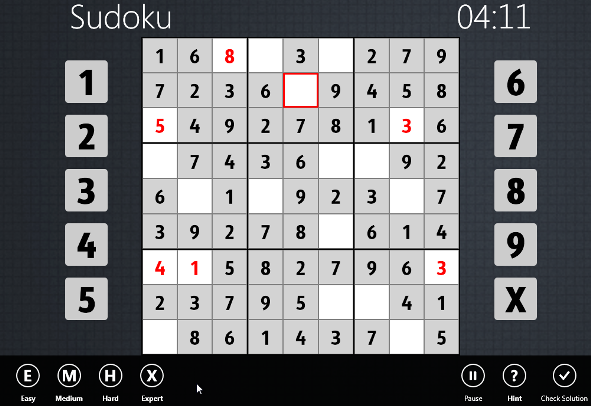
After you have configured the difficulty level to easy Sudoku puzzle, start your first Windows 8 Sudoku game experience.
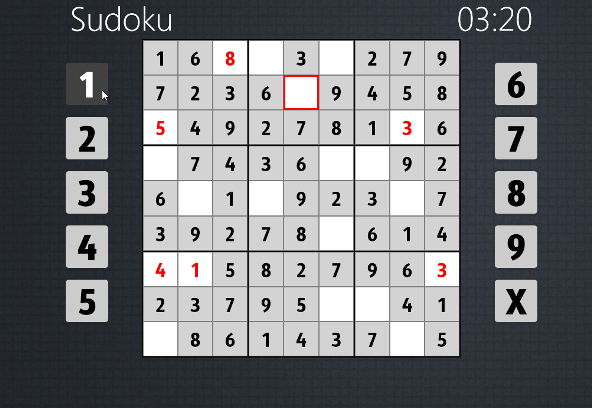
In order to place a number into an empty square, first tap over the empty box. Of course if you have a touch screen option.
Otherwise you can also play Sudoku by clicking on the empty box using your mouse :)
After you activate an empty box, the borders of the empty square will be displayed in red color to distinguish it from others.
Then tap or click on the number that you want to play on the Sudoku game board. That is it to place a number on the Sudoku board for solving the puzzle.