How to Play Minesweeper Game using Windows Minesweeper Flags
Minesweeper flags are used to mark mines in Windows 7 Minesweeper game.
Using flags with speed helps you to build a winning Minesweeper strategy.
Windows players who wonder "How to win Minesweeper game" must be a master of this basic Minesweeper tips.
Game players can mark mines in Windows Minesweeper using two Minesweeper flags.
These flags are :
 : Question mark Minesweeper flag is for marking squares which you can not decide whether safe to open or not.
 : A red Minesweeper flag is used to mark the square on the game board as a mine.
When a square in Minesweeper is marked using a flag, game players can not open that square by left mouse click any more.
This prevents an accidental mine openning and let's the game player to see the game board visualizing the mines.
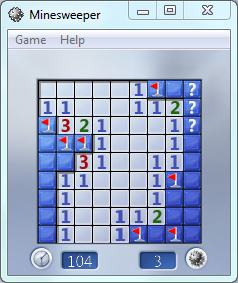
Here is how Minesweeper flags can be used in a Windows 7 game.
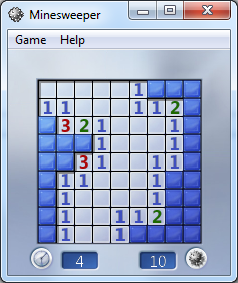
As you see I have identified two mines on the Windows Minesweeper game board.
I mark each mine by a single right-click over them.
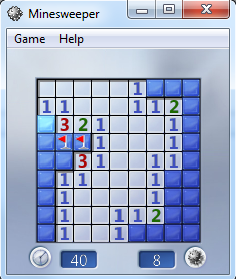
On the top right corner, I had three squares that I doubt them to be mine.
So I decided to mark these mines as questionable with question mark Minesweeper flag.
In order to mark a Minesweeper square with question mark, right-click on the square twice.
On the first click, it will be marked with red Minesweeper flag, the second right-click will mark the square wih question Minesweeper flag.