Game Inkball Download for Windows 8, Windows 7, Windows XP
Windows 7, Windows 8 and Windows 10 users can download Inkball game which was first introduced with Vista for Windows gamers by Microsoft.
Many Windows Vista users like to play the game Inkball on their computers.
You can play Inkball game on Windows 10, Windows 8, Windows 8.1, Windows 7 and even on Windows XP computers by Inkball download given in this gaming article.
When Windows Vista was first released, many Windows users who did not have a Windows Vista OS asked : "Where can I find free Inkball game download for my Windows XP computer?"
Or they may requested for ink ball game download from Gaming sites, etc.
Today Windows Vista and Windows Vista games like Purble Place and Inkball do not exist anymore by default on Windows versions shipped by Microsoft.
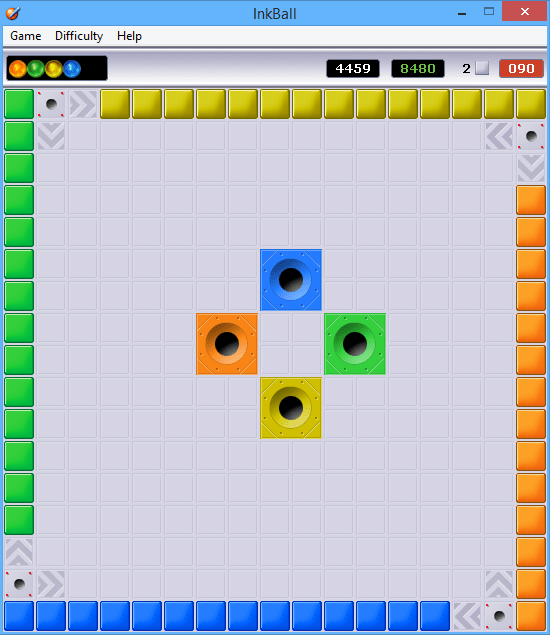
And what is more interesting for Windows 7 users, the new operating system Windows 7 does not include the Inkball game in its Windows games package.
And for Windows 7 gamers used to play Inkball game and enjoy playing Inkball complain the lack of game on Windows 7.
Unfortunately Inkball game is one of the features removed from Windows 7 operating system.
If you were using Windows 7, you might have searched the answer of the following question : "Where can I find free Inkball game download for my Windows 7 computer?"
Or "Where is the inkball download for Windows 7?"
The same question and request continues for Inkball game for Windows 8 and now Inkball for Windows 10, the most recent Windows version available. Where can I download Inkball game for Windows 8, for example and nowadays as "Where is the inkball download for Windows 10" PCs.
Inkball Download for Windows 10, 8.1, 8, 7 and XP
Windows users can download Inkball game setup or Ink ball executable file from Thomas Teuber's site.
You can also download the Windows Vista Inkball game download from my website as a mirror. Please scan the downloaded files before installing against an unwanted vulnerability issue.
So please note that it's your own risk to download Inkball and play inkball from these web sites.
The Inkball game executable file inkball.exe will directly work on Windows XP computers.
After you download inkball just double click and start playing Inkball on your Windows XP pc.

For other versions of Windows including Windows 7, Windows 8 or Windows 8.1, and on Windows 10 players who want to play Inkball game, should download Inkball download from the same free Inkball download links and configure the Inkball application compatibility to Vista.
Then Ink Ball game will run successfully on Windows 10, Windows 8 or on Win7 computers as it is a Windows Vista compatible game.
Configure Inkball Game Compatibility
Here are the required steps to configure Windows Vista Inkball game to run successfully on Windows 10, Windows 8, on Windows 8.1 or on a Windows 7 computer.
Download Inkball game executable zip file and extract it on a local file folder.
Open the context menu by a right click on the Inkball icon.
Select Properties menu option on the inkball.exe context menu.
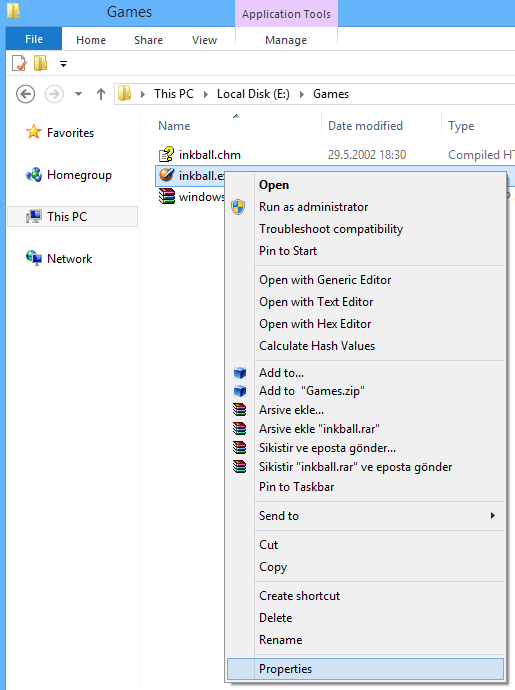
Switch to Compatibility tab on Inkball.exe properties screen.
Under "Compatibility mode" section, make sure you marked the "Run this program in compatibility mode for:" checkbox.
Select "Windows Vista" operating system option from the compatibility modes dropdown list box.
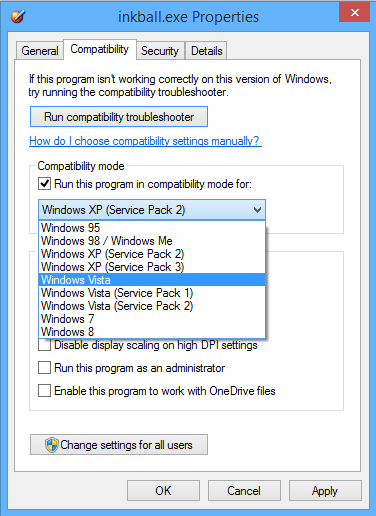
Click on Apply button.
Now you can double click on Inkball game executable inkball.exe to start the game on your Windows PC whatever its version Windows 7, Windows 8 or Windows 10.
On any case when the Inkball game executable stopped running or failed to work successfully, run the Troubleshoot Compability tool and run the ink ball game download file with recommended settings.
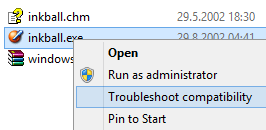
For more help on Compatibility option settings please refer to guide from Microsoft.