Flavor is locked by user on SAP Personas 3.0
Using SAP Screen Personas 3 Flavor Maintenance transaction administrator can delete flavor, restore flavor that is deleted previously or delete flavor permanently using Delete from DB (database)
If you have /PERSONAS/ADMIN_ROLE role assigned to your SAP user, you can launch SAP Screen Personas Flavor Maintenance for mass maintenance. Assume that as a Screen Personas administrator, you want to filter unused flavors and delete flavors created and not used.
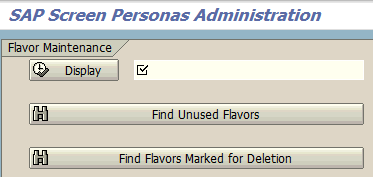
Run /n/Personas/Admin transaction code for SAP Screen Personas Administration screen.
Press on Find Unused Flavors button.
Screen Personas administrator will be directed to SAP Screen Personas Flavor Maintenance - Mass Maintenance screen with a list of unused flavors on an ALV table. In below screenshot, the list of unused flavors and detailed information about each can be seen.
Highlight the flavor row which you want to delete from your SAP system.

To delete flavor, press Delete (Shift+F2) button.

If the flavor deletion process is completed successfully you will be informed by message "Flavor [flavor name] deleted successfully".
And additionally the "Deleted" column on the table view of the selected flavor will be set.
A deleted flavor which is marked as deleted can be restored back. To restore a deleted flavor, simply press Restore F5 button.

In fact, Delete flavor only changes the status of a flavor and prevents its availity for Screen Personas editors and users. Unless you delete flavor permanently from database, it is possible to restore flavor back using Restore.
A flavor can not be directly deleted permanenty using the "Delete from DB" button.
A Screen Personas flavor must be deleted before you can delete it permanently from database.
A permanently deleted flavor is deleted from database and is no longer listed in the list and cannot be restored back.