
TSQL Character Split Function in SQL Server
SQL split function is a common request from T-SQL developers. Since I also required split string functions in SQL Server environment, I create user defined functions for splitting string using seperator characters. But recently while reading MSDN Transact-SQL forums, I see that one of the sql developers require a split sql function to set a part each character in the input parameter without using any seperator character.
The given SQL Server split function in this t-sql tutorial returns each alpha-numeric character of the input string in different rows in order back to the user as output. One important task for this string function is it adds additional null values between characters, if there is a numeric character in the input string.
For example if the input string for split function is "A2B" then the output is expected as "A,NULL,NULL,B" each in different rows.
Here is the source SQL code of the string split function created for this task.
CREATE FUNCTION [dbo].[SPLIT] (

 @str_in VARCHAR(8000)

)

RETURNS @strtable TABLE (id int identity(1,1), strval VARCHAR(8000))


AS


BEGIN


DECLARE @tmpStr VARCHAR(8000), @tmpChr VARCHAR(5), @ind INT = 1, @nullcnt INT = 0

SELECT @tmpStr = @str_in


WHILE LEN(@tmpStr) >= @ind

BEGIN


 SET @tmpChr = SUBSTRING(@tmpStr,@ind,1)

 IF ISNUMERIC(@tmpChr) = 0

  INSERT INTO @strtable SELECT @tmpChr

 ELSE

  WHILE @nullcnt < @tmpChr

  BEGIN

   INSERT INTO @strtable SELECT NULL

   SET @nullcnt = @nullcnt + 1

  END

 SELECT @ind = @ind + 1, @nullcnt = 0


END


RETURN


END

GO
When we test the above user defined function using the below command:
SELECT * from dbo.SPLIT('sql1split2function')
The output select list of the sql split function will be as follows:
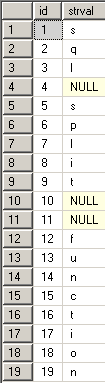
T-SQL programmers can find a long list of split function examples in the following tutorials:
MS SQL Server Recursive T-SQL Sample Split Function
Split String using XML
Case Sensitive SQL Split Function for SQL Server Developers
SQL Server String Split T-SQL CLR Function Sample
T-SQL Split User Defined Function discussion