
SQL Server String Split T-SQL CLR Function Sample
String split task in SQL Server up to SQL Server 2016 for Transact-SQL developers is a major problem and a vital requirement just like for every programming language.
There is not a built in SQL Split function that comes out-of-box with MS SQL Server even with SQL Server 2005, SQL Server 2008 and later versions up to SQL Server 2016 introduces String_Split SQL function
But T-SQL programmers have developed many sql split string functions using T-SQL codes custom for their requirements.
In this web site developers and administrators can find a few of those mentioned SQL Server split string functions just like 2-dimension SQL CLR split function
Since string split process is not a major task of database applications, databases like Microsoft SQL Server are not expected to give high performance on records of thousands and millions when sql split string is the topic.
SQL Server CLR is one of the best enhancements of Microsoft SQL Server 2005 on T-SQL development for performance and extending SQL programming features.
SQL CLR enables developers to create SQL CLR stored procedure and SQL Server CLR function to build complex processes easier and perform better using VB.NET or C#.
String split is one of the sample applications where SQL Server CLR functions will perform better in SQL Server 2005 and SQL Server 2008.
In this SQL CLR tutorial, developers will see VB.NET codes of a SQL Server CLR function.
And later we will create SQL split function referring that sql CLR string split function.
CLR Split String Function VB.NET Code
Let's start by sharing the Visual Studio VB.NET codes of the CLR assembly class library project.
Create a new Class Library project and copy the below VB.NET codes and paste on the class file source codes. The two imported libraries enables CLR development and registering this library file as CLR assembly in SQL Server.
Imports System.Data.SqlTypes

Imports Microsoft.SqlServer.Server


Public Class SQLCLRFunctions


  <SqlFunction(FillRowMethodName:="FillRowMethod", TableDefinition:="String nvarchar(max)")> _

  Public Shared Function SplitString(ByVal InputString As SqlString, ByVal Seperator As SqlString, ByVal RemoveEmpty As Boolean) As IEnumerable


    Dim DelimitersList() As String

    ReDim DelimitersList(0)

    DelimitersList(0) = Seperator.Value.ToString


    If RemoveEmpty Then

      Return InputString.Value.Split(DelimitersList, System.StringSplitOptions.RemoveEmptyEntries)

    Else

      Return InputString.Value.Split(DelimitersList, StringSplitOptions.None)

    End If


  End Function


  Public Shared Sub FillRowMethod(ByVal row As Object, ByRef InputString As String)

    InputString = DirectCast(row, String)

    InputString = InputString.Trim()

  End Sub


End Class
Now build CLR project using Ctrl+Shift+B keyboard short-cut.
If everything is expected, you will get a similar response from Visual Studio seen as below.
------ Build started: Project: CLRSplit, Configuration: Debug Any CPU ------
CLRSplit -> C:\VS\2008\CLR-Split\CLRSplit\bin\SqlCLRClassLibrary.dll
========== Build: 1 succeeded or up-to-date, 0 failed, 0 skipped ==========
We will use the above assembly path while creating the assembly in MS SQL Server 2008 database.
CLR Split String Function T-SQL Code
First list all assemblies defined in the database by querying the sys.assemblies system view
SELECT * FROM sys.assemblies
Probably if you have not created your CLR assembly in your SQL Server database before, you will not see your CLR project in the sys.assemblies view.
To create an assembly in SQL Server database, use the following syntax replacing with corresponding assembly name and assembly path for your case.
CREATE ASSEMBLY SqlCLRClassLibrary FROM
'C:\VS\2008\CLR-Split\CLRSplit\bin\SqlCLRClassLibrary.dll'
WITH PERMISSION_SET = SAFE
After the above SQL command is executed successfully, SQL programmers can see their sample assembly in the sys.assemblies system view.
Now SQL programmers are ready to create the user defined function which uses the registered assembly file.
Here is SQL DDL codes to create a new CLR function in SQL Server
CREATE FUNCTION CLRSplitStringFunction (

 @String nvarchar(max),

 @Seperator nvarchar(max),

 @RemoveEmpty bit

)

RETURNS TABLE (

 string nvarchar(max)

)

AS EXTERNAL NAME

 SqlCLRClassLibrary.[CLRFunctions.SQLCLRFunctions].SplitString;

 --AssemblyName.[RootNamespace.ClassName].SQLFunctionName

GO
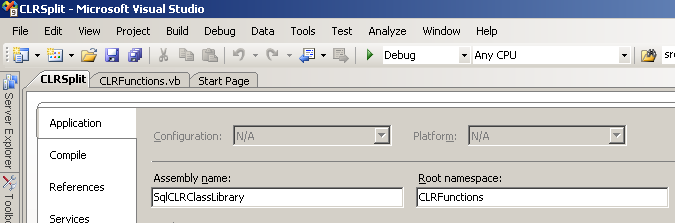
SQL developers or Visual Studio developers can view the assembly name and the namespace on the Properties windows of the solution project.
Now SQL developers are ready to use new SQL CLR function in a sample T-SQL code to split a given string using a predefined identifier or seperator.
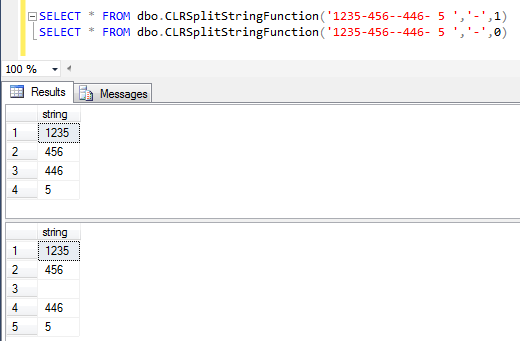
Below code is splitting a concatenated string expression formed of numbers and separated by "-" character.
SELECT * FROM dbo.CLRSplitStringFunction('1235-456--446- 5 ','-',1)

SELECT * FROM dbo.CLRSplitStringFunction('1235-456--446- 5 ','-',0)
Besides the SQL CLR split functions, alternatively if you are interested in other CLR samples, for example to create random integer number using SQL Server CLR please review our tutorial: Generate Random Integer Number using SQL Server CLR Function.