
What is Windows ReadyBoost and How to Configure ReadyBoost on Flash Disks
Memory is the main consideration for most systems and operating system. Especially for Windows Vista, since it uses the graphics features for Avalon to maximize media outcome memory is one of the most hesitated point on Vista.
Adding memory (RAM) to increase the memory size of your system is the best way to make your pc ready for Vista, or even for other system to make it run with a better performance. But sometimes adding memory or RAM is not so easy to achieve.
Windows Vista now offers an easy way to increase your systems memory easily and by just attaching a standart USB (universal serial bus) flash drive. This additional flash memory is regarded as an additional memory cache that will be accessed faster than a hard drive.
And it is so simple to configure your removable disks or USB flash drives for ReadyBoost.
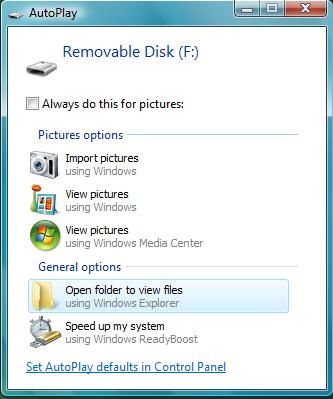
When you add the USB flash drive on your system, the AutoPlay popups the below screen for the new Removable Disk attached to your current system.
Please take your attention on the "Speed up my system using Windows ReadyBoost" button on the bottom of the AutoPlay screen popup.
If you want to use some sections or parts of this additional memory as the computers memory cache, continue by selecting the "Use this device" option on the ReadyBoost tab. Note that Vista offers an amount of memory that can be reserved for use of memory cache. It is recommended to accept the suggested amount of memory unless you plan to use some amount on the removable disk for file storage. Any way you can adjust the amount of memory for ReadyBoost. But do not forget that the removable media device (flash disk) must contain at least 256 MB disk space for Windows ReadyBoost.
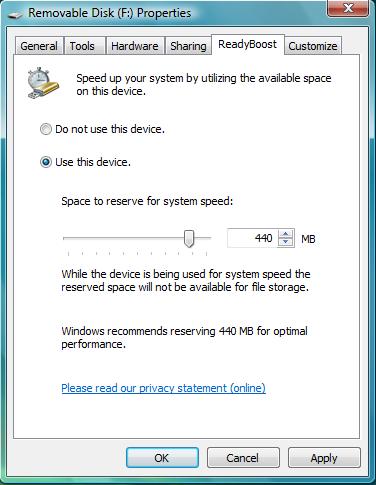
Click Apply to take affect the new settings for ReadyBoost.
If you open the Windows Explorer and click on the Removable disk, on the right pane you will see that an amount of memory (or disk space) is reserved as ReadyBoost in the file type of ReadyBoost Cache File. For my USB drive you can see that 440 MB is reserved.
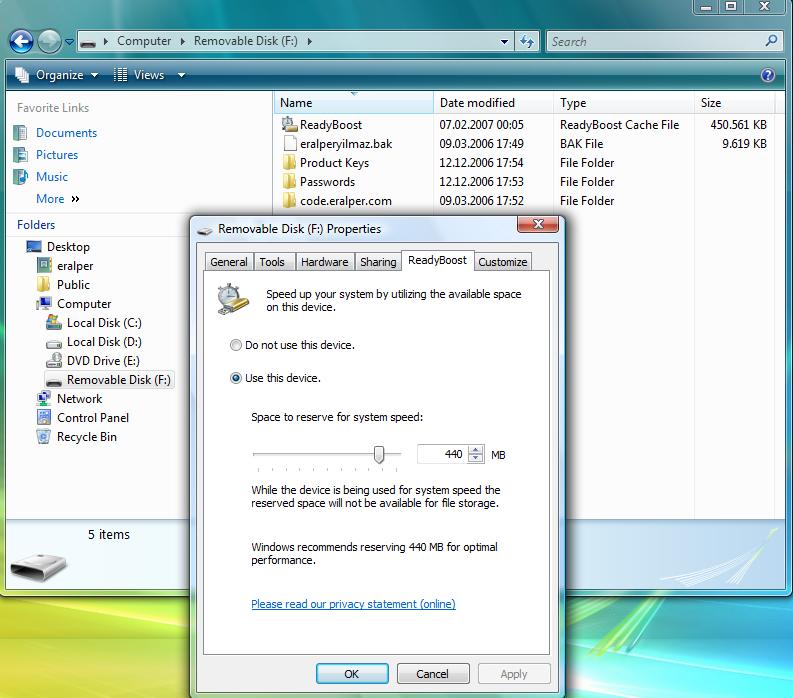
You can open the properties of the removable disk or the ReadyBoost file properties to see the configured options for ReadyBoost.