Microsoft MapPoint Web Service Version 3.5 ile Harita Üzerinde Adres Görüntüleme
Microsoft MapPoint Web Service kullanarak harita üzerinde uygulamalar geliştirebilirsiniz. Bu makalede MapPoint ile uygulama geliştirmeye giriş olarak harita üzerinde bir nokta görüntülemek üzerinde duracağız.MapPoint Web Service hizmetlerinden faydalanabilmek için belirli bir ücret ödemek zorundasınız. Ancak https://mappoint-css.partners.extranet.microsoft.com/MwsSignup/Eval.aspx adresinden dolduracağınız form ile başvuruda bulunarak 45 günlük MapPoint Web Service Developer Account adı altında geçici bir account'a sahip olabilir ve bu account yardımı ile development süreniz boyunca MapPoint Web Service hizmetlerinden yararlanabilirsiniz.
MapPoint Web Service ile geliştireceğiniz uygulamalarınızda belirtilen web servisini projenize web referansı olarak eklemeniz gerekmekte.
Eklenmiş bu web referansı ASP.NET code behind sayfasında en başta Imports ile aşağıdaki gibi kullanabilirsiniz.
|
Imports MapPoint.net.mappoint.staging |
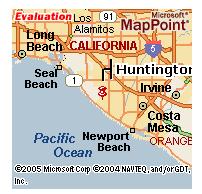
Bu yazının konusu olan örnek uygulamada Amerika Birleşik Devletleri üzerinde bir noktanın harita üzerinde görüntülenmesini göreceğiz. Görüntülemek istediğimiz adresimiz "Huntington Beach, CA" olsun.
ASP.NET uygulaması geliştirdiğimizi varsayarak web formumuz üzerinde bir Image kontrolümüz ve bir de Button kontrolümüz olduğunu varsayalım. Butona bastığımızda adresimizi Image kontrolümüz üzerinde görüntüleyelim.
Butonumuzun Click event'i için çalışmasını istediğimiz kodu aşağıdaki gibi oluşturalım.
|
Private Sub buttonShowOnMap_Click(ByVal sender As System.Object, ByVal e As System.EventArgs) Handles
buttonShowOnMap.Click |
Kodu incelediğimizde göreceğiz ki oluşturduğumuz MapPointWebServiceCredentials objesi ile MapPoint WEB Service için gerekli Authentication'ı sağlamış oluyoruz. NetworkCredential 'ı oluştururken gerekli olan UserName ve Password başvuruda bulunduğunuz MapPoint Web Service Developer Account ile size sağlanacaktır.
|
' MapPoint WEB Service Authentication |
FindServiceSoap ile haritada kullanacağımız noktalar için arama fonksiyonlarını sağlıyoruz. RenderServiceSoap ile de bu noktaların harita haline getirilmesi ile ilgili işlemleri gerçekleştiriyoruz.
|
Dim renderService As New RenderServiceSoap |
Göreceğiniz üzere her bir servis için (RenderServiceSoap ve FindServiceSoap) Credential tanımlamamız gerekiyor.
Ardından aradığımız noktayı ifade eden pointSpec objesini yani FindSpecification class'ının bir örneğini oluşturuyor ve gerekli bilgileri bu objenin property'leri olarak atıyoruz.
|
' Point of Interest |
Aradığımız noktanın özelliklerini belirttikten sonra dönecek olan sonuçları bir dizide tutmak için FindResults tipinde bir dizi oluşturuyoruz. FindServiceSoap class'ının instance'ı olarak oluşturduğumuz findService objesinin Find metodu ile de aramamızı gerçekleştiriyoruz. Bu aramadan dönen sonuçları findPointResults objesinde saklamış olduk.
Artık haritamızı oluşturmak için kodlarımızı yazabiliriz.
Pushpin objeleri ile haritada işaretlemek istediğimiz noktaları belirtiyoruz. Örnekte işaretlemek istediğimiz tek nokta aramamızın sonucu dönen ilk nokta olsun. Bu da findPointResults.Results(0) içinde saklıdır. LatLong özelliği Latitude ve Longitude anlamlarına yani enlem ve boylam anlamına gelmektedir. Böylece işaretlemek istediğimiz noktanın enlem ve boylamını elde etmiş ve bunu Pushpin dizisinde saklamış olduk.
|
' Pushpins |
Ardından bir View objesi oluşturuyoruz.
|
' Views |
Ve haritamızın özelliklerini oluşturuyoruz. Pushpins ve Views objeleri burada haritamızın özelliklerini toparlayan MapSpecification objesi ile eşleştiriliyorlar.
|
' MapSpecification |
En son adım olarak MapImage'ımız RenderServiceSoap class'ının objesi olan renderService tarafından GetMap metodu ile oluşturuluyor.
|
' Get Map |
Ve ASP.NET formumuz üzerinde yeralan Image kontrolümüz RenderServiceSoap objemizin GetMap metodu ile elde ettiğimiz MapImage nesnemiz ile ilişkilendirilerek haritayı görüntülemesi sağlanıyor.
|
Image1.ImageUrl = mapImage(0).Url |
Yukarıdaki kod parçası ile elde ettiğimiz harita görüntüsünü aşağıda görebilirsiniz.