
Keep your private files in Microsoft Private Folder 1.0
You can keep your private files in a password protected folder on your Windows XP computer. Microsoft released a small tool named Microsoft Private Folder 1.0 recently which is a useful tool for you to protect your private data. Microsoft Private Folder 1.0 has a total size of 1.5 MB setup msi file. It is easy to install the MS Private Folder.
After the installation you need to configure the Private Folder for your privacy. If you see the below icon on your desktop, then your Private Folder 1.0 needs a configuration because this icon indicates that it is not yet customized after the setup.

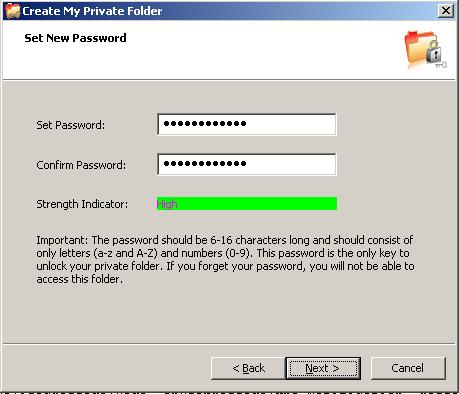
If you double click and run the Microsoft Private Folder 1.0 for configuring, a welcome screen is displayed. You are informed that when you create your own private folder, you can use it to store your private data. The following screen is the creating and setting the password for your Private Folder. The screen consists of a password entry textbox, a confirmation textbox for your password entry and a strength indicator for the password you are defining. For a strength password, use a combination of numbers, and letters with capitals and small letters. Do not forget if you forget your password, you will not be able to access this folder and files in that folder.
After you have successfully set your password for the My Private Folder, you can access your private folder from the shortcut placed on your desktop.

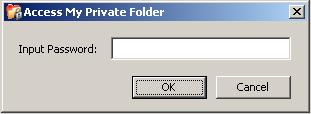
If you try to open and access your private folder you will be asked to enter the password you have defined while setting your My Private Folder application.
After you enter the correct password for your private folder, you unlock your private folder and you can explore and access the contents of yout private folder. The icon below indicates that the My Private Folder is in unlocked status. You should not forget your private folder to lock.

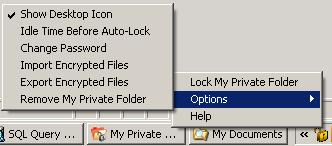
Also a tray icon is placed on your work place. The options you have with your My Private Folder application can be listed as follows:
Lock My Private Folder
Set idle time before auto-lock option
Change password for your private folder
Import encrypted files
Export encrypted files
And remove My Private Folder
My Private Folder enables the users to keep their private files or data protected who share their PCs or accounts with others. My Private Folder 1.0 created only one password protected folder which is called "My Private Folder" and placed on your desktop for your use to save your personal and private files.
The requirements for the Microsoft Private Folder 1.0 are a Windows OS which is one among Microsoft Windows XP Home Edition, Professional Edition and Media Center Edition with SP2 and a Super VGA (800 x 600) or higher-resolution video adapter and monitor.
Microsoft Private Folder 1.0 requires genuine Windows validation in order to download. Microsoft Private Folder 1.0 is free but it does not have a product support.
Unfortunately Microsoft removed downloads for Microsoft Private Folder