Define Keyboard Shortcuts in SQL Server Management Studio to Simplify T-SQL Commands
Did you get tired of coding the same statement like "SELECT * FROM ...", or "sp_helptext ...", or "sp_help ...", etc repeatedly?
Why don't you use SQL Server Management Studio Query Window keyboard shortcuts or Keyboard Query Shortcuts?
Just highlight the SQL Server object name on Query Editor window and press shortcut keys.
Follow the following menu options in Microsoft SQL Server Management Studio IDE.
Tools > Options...
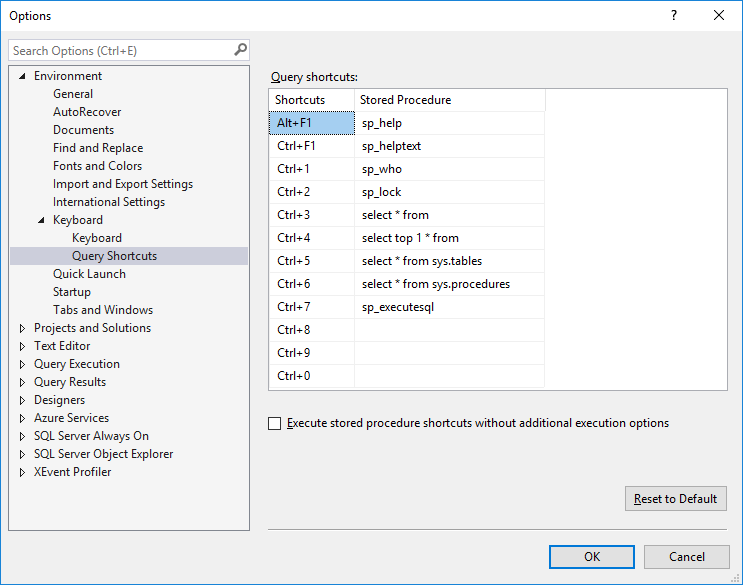
When Options configuration dialog screen is displayed drill-through Environment > Keyboard or on SQL Server 2017 Management Studio Environment > Keyboard > Query Shortcuts
SQL Server professionals will see a screen similar to shown below.
The default keyboard shortcuts defined are :
Alt+F1 for sp_help,
Ctrl+1 for sp_who, and
Ctrl+2 for sp_lock
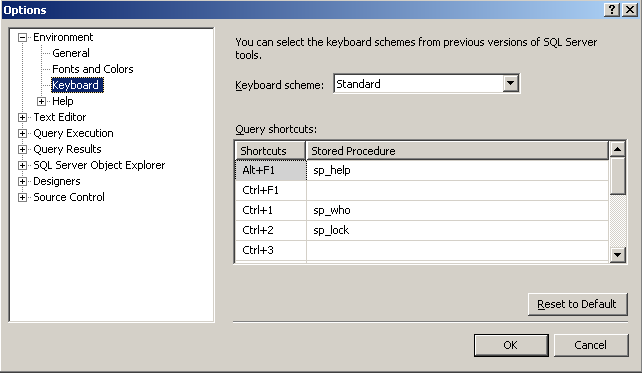
Note : One important thing about this keyboard shortcuts is if you make a change on the list you must open a new Query Editor window to see the changes affected.
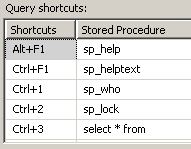
But since I use sp_helptext system stored procedure to see the create script of a SQL Server stored procedure, sql function, etc I added sp_helptext in this list as well.
Ctrl+F1 for sp_helptext
An other SQL statement that I frequently use is selecting all rows from a database table.
Simply "SELECT * FROM [table name]" command. I added this as well like :
Ctrl+3 for select * from
Another addition can be "SELECT TOP 1 * FROM" in the keyboard shortcut list. If you want to visualize how data is in the target database table.
Here is a list of keyboard shortcuts that I use in SQL Server Management Studio Query Editor windows frequently. I believe you will like this shortcuts and generate yours by using this small user-friendly SQL Server tool
For my most recent SQL Server 2017 installation, I am using following keyboard query shortcuts:
Alt+F1 for sp_help,
Ctrl+F1 for sp_helptext,
Ctrl+1 for sp_who
Ctrl+2 for sp_lock
Ctrl+3 for select * from
Ctrl+4 for select top 1 * from
Ctrl+5 for select * from sys.tables
Ctrl+6 for select * from sys.procedures
Ctrl+7 for sp_executesql