
Surround With Feature New in SQL Server 2012
One of new features of SQL Server 2012 is Surround With feature in Microsoft SQL Server Management Studio (SSMS). New "Surround With" enhancement in SSMS Query Editor screen makes it easier to code and edit T-SQL in the Query Editor screen for sql developers.
SQL Server Management Studio Surround With improvement enables T-SQL programmers to enclose a block of sql script with IF conditional statement, WHILE loop block or with BEGIN END blocks.
Here is a demonstration of the Surround With enhancement in programmability in SQL Server Management Studio of new SQL Server 2012.
Highlight the sql script or lines of T-SQL code block that you want to surround with one of the block statements and then right-click.
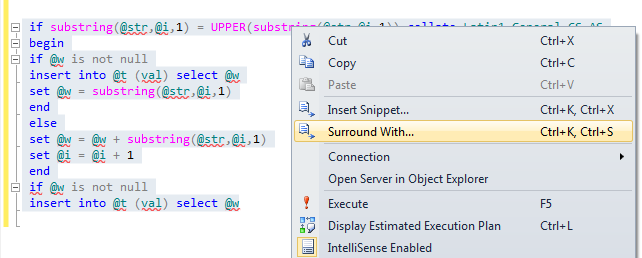
From the displayed context menu, select Surround With... option.
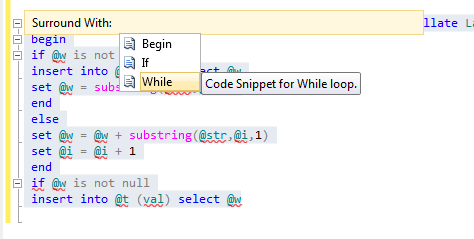
The short list of possible enclose options will be displayed for your choice.
Code snippet for Begin...End block.
Code snippet for If construct.
Code snippet for While loop.
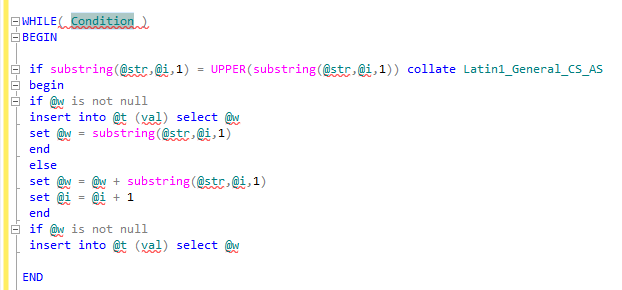
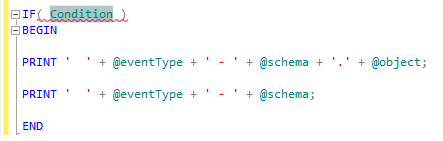
The condition to evaluate is in different color and the cursor is highlighting the condition.
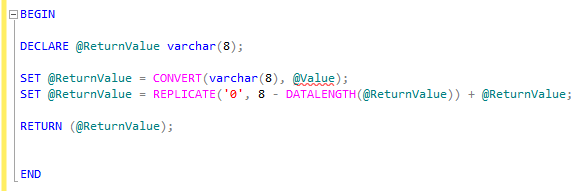
Code snippet for Begin and End block.
Code snippet for If construct.
--From the list of options available in the Surround With drop down list, select the appropriate option/construct in which you want your code selected in first step to be enclosed.
--This will enclose the selected code snippet (in step 1) into the selected construct (in step 2) as shown below