Create SAP Dynamic Variant using Date Calculation
SAP dynamic variant creation is a must for more flexible ABAP reports that are more user-friendly. For example if SAP users are using an SAP program which displays current date's orders, in order to prevent them to choose the today's date from select screen everytime they execute the report. ABAP developers can create dynamic variant in SAP for that report, so that the date select option will always display today's date (current date)
Actually a dynamic variant uses a variable and a calculation formula to set the value of the selection option variable on the screen every time the report is called.
In this ABAP tutorial, I'll try to define dynamic variable for date selection-option so that it will always display 6 months earlier than today.
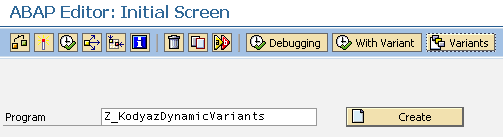
Call SAP transaction SE38 just as you will run the target ABAP report.
Type the ABAP report name into the Program textbox in SAP SE38 transaction screen.
Do NOT press Enter or F8 function key.
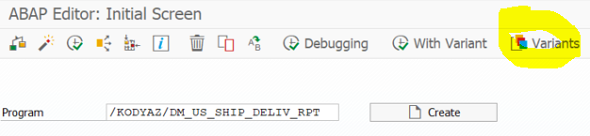
Instead on the top menu where icons and buttons are listed, you will see Variants button.
Press Variants button in order to create dynamic variant for your ABAP program or to modify an existing variant.
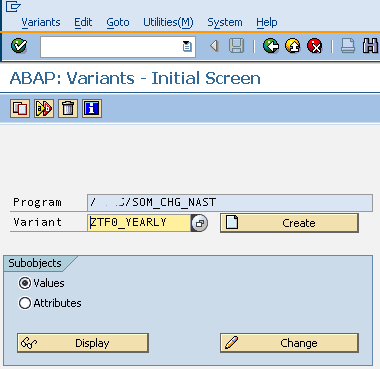
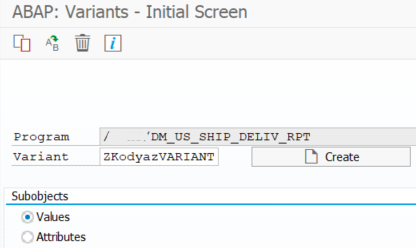
When you pressed Variants, the next screen will let you select the SAP variant for the ABAP report that you will configure as a dynamic variant.
This screen is named as "ABAP Variants - Initial Screen" as you see in below screenshot.
You can select the possible SAP variants defined for the related SAP program by pressing the F4 for the value help screen.
Or you can just type a name for your dynamic SAP variant, and press the Create button next to the Variant textbox.
I will change the SAP variant named ZTF0_Yearly and define a dynamic date for the ABAP select options. So after selecting the variant name, I selected "Value" select option and then pressed Change button to make the changes
ABAP developers are now ready to configure SAP variant select option values using the below screen. I want to configure the date field so that it will be dynamically calculated and displayed every time the ABAP report screen is called with this SAP variant. The date select option is set to a static value currently. We will change it with a dynamic calculation.
Before continue with the next step, you can provide static values that are needed for selection options
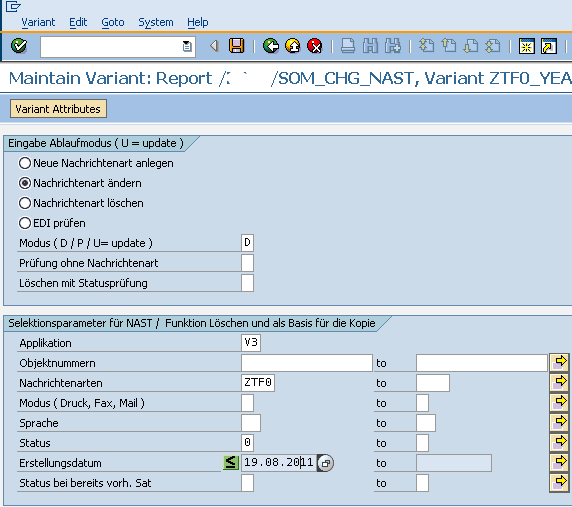
In order to modify the SAP screen select option for date field, click on the date select option on the screen.

After the related select option field is selected by placing the cursor onto that field, press the Variant Attributes button which is on the top icons and buttons menu
The SAP variant configuration screen is displayed. You will see a long list of parameters and select option attributes that can be configured by just marking the checkboxes for that variant. It is also possible to define a dynamic variant calculation rule on this screen. I'll now show ABAP developers how to set the value of the date select-option field dynamically to 6 months before than the current date.
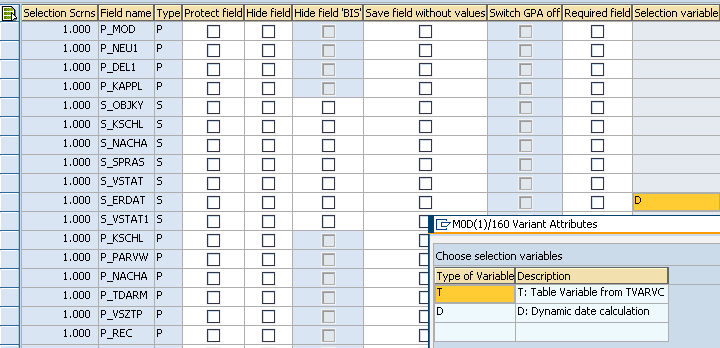
The date select option field is S_ERDAT.
By configuring the Selection variable column properties, ABAP developers can create a dynamic variant for their ABAP reports.
Just click on the Selection variable column and from value help screen choose "D" as type of variable which means D: Dynamic date calculation.
I'll not continue with this ABAP tutorial with the T, variable type which means T: Table Variable from TVARVC. This is a topic of an other ABAP tutorial.
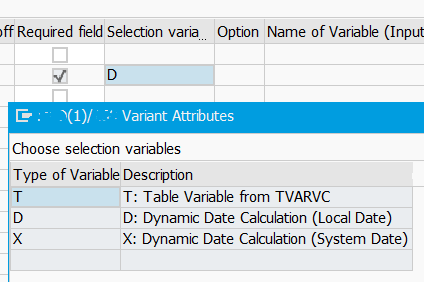
Besides T and D a new variable type X is added on SAP systems which is as follows:
T: Table Variable from TVARVC
D: Dynamic Date Calculation (Local Date)
X: Dynamic Date Calculation (System Date)
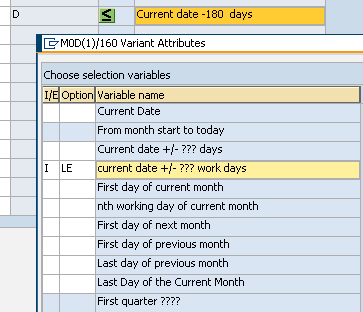
ABAP developers can use the following Dynamic Date Calculation formulations in order to create SAP dynamic variant variables.
Dynamic Date Calculation formulations:
Current Date: Always displays the current date when the screen is called
From month start to today: Defines a range of dates between the first of month to today
Current date +/- ??? days: Calculates a date by adding or substracting a predefined amount of days. I'll use this option to set a dynamic date which is 180 days before today. That is nearly 6 months before today.
Current date +/- ??? work days: Calculate a second date by adding (or substracting) a fix amount of working days from current date
First day of current month: Displays the first day of current month
nth working day of current month: Displays the Nth working day of current month
First day of next month: Displays the first day of the next month
First day of previous month: Displays the first day of the previous month
Last day of previous month: Displays the last day of the previous month
Last Day of the Current Month: Displays the last day of the current month
First quarter ????: Displays the first quarter as a date range
Second quarter ????: Displays the second quarter as a date range
Third quarter ????: Displays the third quarter as a date range
Fourth quarter ????: Displays the fourth quarter as a date range
Current date - xxx,current date + yyy: Displays date range calculated between by substracting xxx days from today and adding yyy days to current date
Date - xxx, Date + yyy (work days): Makes the same formulation as above calculation but this time using work days
Previous month: Shows the previous month as a date range period
Current period: Shows the current month as a date range period
(Beginning of mth-xx months, end of mth+yy months):
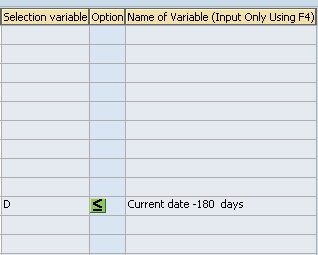
You can see the dynamic variant configuration for the S_ERDAT select field on the below screen.
The Sign is selected as I (inclusive) among I/E. E stands for exclusive.
The Option is "<=" which is for "Less than or Equal to"
And for the parametric number of days, I provided the 180 days which is approximately 6 months.
This is after the dynamic variant configuration is completed for date select option field in your SAP program select-options screen
I hope to answer the question "how to create dynamic variant in SAP selection screen" for date fields using a date calculation formula in this SAP tutorial.
Create Dynamic Date Range in Program Variant
What if the developer wants to create a date range for a select option dynamically using ABAP program variants. For example, I have a select option field for "Delivery creation date" and as ABAP programmer I want to see the last one year in the select option low and high values dynamically without any change in the ABAP program.

Let's start from beginning.
On SAP SE38 tcode, after you enter the ABAP program name, click on Variants
Type a brief descriptive name for the report variant and press Create
If there are some required fields among select options, enter valid input values and then save the variant.
The delivery creation date is a required field for my sample case.
I entered some dummy values at the moment. Later I'll let SAP system to populate the date range (low and high values for the S_ERDAT) automatically via dynamic variant.
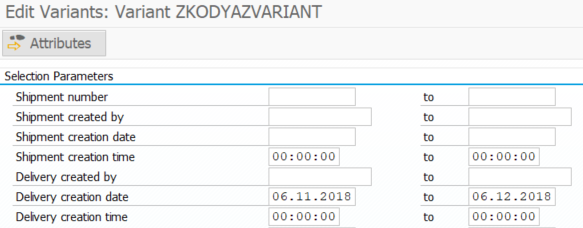
To save the entered values press F3 (Back icon) and when you are asked to save the variant select option values, press Save.
When the variant attributes screen is displayed, a similar screen will be displayed. We will provide details in "Selection variable" and "Name of Variable" fields to create a dynamic variant select-option for the date range in following steps.
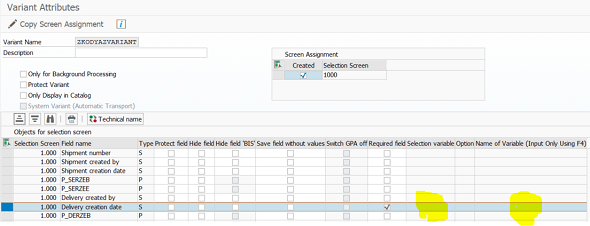
Press the F4 Help icon at field "Selection variable" for the select-option fields of date type.
A list of Variable Types will be displayed.
ABAP programmers can choose D, or X for example at this step.
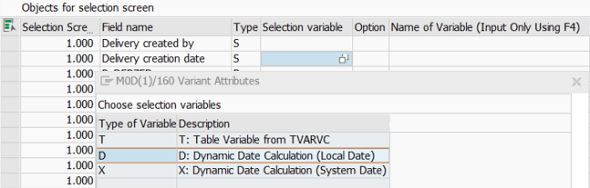
As the second step, at field "Name of Variable" press F4 to see possible options.
First options provide single default value for LOW option of the selection screen field.
But the options at the bottom of the list, they provide two default values; one for -LOW and one for -HIGH part of the range objects.
For example:
Current date - xxx, current date + yyy
Date - xxx, Date + yyy (work days)
(Beginning of mth-xx months, end of mth+yy months)
I will choose the option "Current date - xxx, current date + yyy" and use 365 for xxx and 0 for yyy parameters.
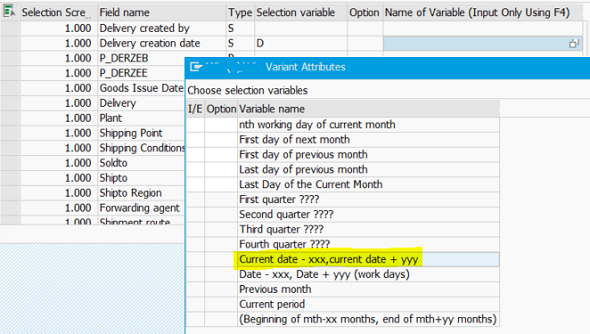
This selection will create default values for the delivery creation date since 1 year back up to current date
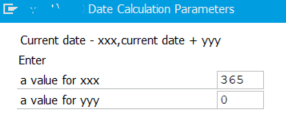
Save the changes on the variant attributes
If the ABAP developer or SAP user executes the target report with this variant, the default values will be as assigned for the period of last year automatically by the dynamic variant.