
SQL Server administration and T-SQL development, Web Programming with ASP.NET, HTML5 and Javascript, Windows Phone 8 app development, SAP Smartforms and ABAP Programming, Windows 7, Visual Studio and MS Office software Kodyaz SAP and ABAP Programming Tutorials
Development resources, articles, tutorials, samples, codes and tools for .Net, SQL Server, Vista, etc.


Win FREE BOOK
from Kodyaz


CRM Companies List
Web Based CRM Software

How to Spell Numbers using ABAP Spell_Amount Function Module

SAP professionals can use ABAP Spell_Amount function module in order to spell numbers and currency values into string variables. It is very easy in different languages the answer of "How to Spell Numbers in SAP" using Spell_Amount ABAP function module.

In this ABAP tutorial, developers will find a sample ABAP report using Spell_Amount to convert numeric value or currency amount entered in the selection screen into string and display on the screen using Write command. I frequently use SPELL_AMOUNT function module to display gross amount or total value in words on SAP Smartform output of invoice records.

What makes Spell_Amount perfect for spelling price, amount fields and number values is it can spell in different languages. The Spell_Amount function module excepts a Language input parameter and returns the spell in the input language. Either German, English, Turkish, Spanish, Russian, ABAP developers can easily return decimal values and integer part of the number seperately easily.

Since the Spell_Amount return a SPELL type structure, developers should be aware of both fields word and decword of the output structure. The decword will return limited values from 0 to 99 for example. But the integer part word can handle greater numeric values.

Here is the ABAP report source code that ABAP developers can use in order to convert numeric values, numbers and currencies into string. The following ABAP report is using Spell_Amount in order to spell numbers into string variables and display on the output screen.

PARAMETERS:
 pLANGU LIKE T002-SPRAS DEFAULT SY-LANGU,
 pCURR LIKE TCURC-WAERS DEFAULT 'USD',
 pAMOUNT LIKE VBAP-MWSBP ,
 pFILLER(1) TYPE C DEFAULT ' '.

DATA :
 WS_SPELL TYPE SPELL.

CALL FUNCTION 'SPELL_AMOUNT'
 EXPORTING
  AMOUNT = pAMOUNT
  CURRENCY = pCURR
  FILLER = pFILLER
  LANGUAGE = pLANGU "SY-LANGU
 IMPORTING
  IN_WORDS = WS_SPELL
 EXCEPTIONS
  NOT_FOUND = 1
  TOO_LARGE = 2
  OTHERS = 3
.
IF sy-subrc <> 0.
 MESSAGE ID SY-MSGID TYPE SY-MSGTY NUMBER SY-MSGNO
  WITH SY-MSGV1 SY-MSGV2 SY-MSGV3 SY-MSGV4.
ELSE.
 WRITE :/ WS_SPELL-word , WS_SPELL-decword.
ENDIF.

Here is the selection screen of the ABAP report ZSPELLAMOUNT.
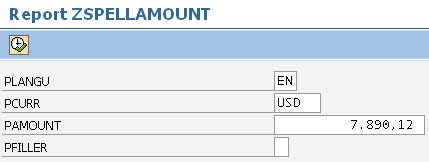
spell_amount function module

And this is the output screen displaying the spelling of input number value in given language
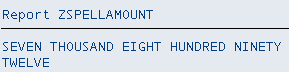
ABAP Spell Amount FM

If you also want to display the currency code, for example USD or UAH, you can use VBRK-WAERK for example. And concatenate WAERK field with WS_SPELL-word and WS_SPELL-decword spelled amount text. It is also possible to query SAP table TCURT using ABAP SELECT statement as seen below for short name of the document currency.

SELECT SINGLE * FROM TCURT WHERE WAERS = pCURR

And then you can use the TCURT-KTEXT field for currency text instead of displaying WAERK field directly.



SAP Tutorials

SAP Tutorial

SAP Forums

SAP Tools

SAP Transaction Codes Table


Recent and Top SAP Tutorial and ABAP Tutorials

Read Pricing Condition Text using ABAP in SAP Sales Document Output
Export SAP Data to Fixed Length Text File
Save Table Contents into Text File and Download File
Business Document Service Error: Error when accessing graphic (BDS), RC = 5
Get Proforma Invoice from Commercial Invoice in ABAP
Convert Sales Unit into Text using Function Module in Target Language
Get Fullname of SAP user using Function Module in ABAP Program
ABAP Submit Report to Run Another ABAP Program within Code
Message no XS826: Cannot process message; no node determined for 76550052
SE63 Smartform Translation and Export using SLXT Program
VF31 SAP Transaction to Reprocess Billing Output Messages
Import and Export SO10 Standard Text using RSTXSCRP ABAP Program
CALL_FUNCTION_NOT_FOUND ABAP Run Time Error
SAP Output Management - Create New SAP Output Type
SAP Purchase Order Tables, Transaction Codes and Output
Assign SAP Item Category to Sales Document Type using SPRO
Window MAIN does not fit onto page PAGE (height)
SAP Invoice Output ZZZZ is not Defined
Invoice Output fail because of missing Billing Type text in TVFKT table
Read Integer and Decimals of a Numeric Value in ABAP Programming
SAP Smartforms Table Parameter in Form Routine
Complex Conditions in SAP Smartform with AND/OR
Free Adobe LiveCycle Designer Download
Create SAP Dynamic Variant using Date Calculation
Translate Web Dynpro Header Title displayed on Web Browser
ABAP RegEx for ABAP Regular Expression to fetch Date from String
Change Output Condition Records
Web Dynpro Text Translation using Assistance Class
Move Minus Sign from Right to Left of Negative Number in SAP Smartform
Read Address Data using FM ADDR_GET instead of Querying ADRC Table
Add Value Help to Web Dynpro Select Options
Add Web Dynpro Applications to SAP Favorites Menu
Component Usage ALV Does Not Have an Active Component
Web Dynpro Component Service Syntax Error in Program /1BCWDY/O3EC1AX6A3OVKK9L5FXO==CP
Web DynPro Tutorial - Display Spool Requests using Web DynPro Table
Web DynPro Tutorial - How to create Web Dynpro Application (Web Dynpro Component)
Display Data on Web DynPro Table Element
Test Web Dynpro ABAP Component by Creating Web Dynpro Application
Insert SAP Icons and Symbols on Smartform Documents
How to Display Text on Sap Smart Forms
Graphics White Background Displayed Grey on SAP Smartform Output
Get SAP Document Flow using SD_DOCUMENT_FLOW_GET ABAP Function Module
Convert Numeric Value or Currency into String Spell_Amount Function Module
How to Transport SAP Graphics using SE78 Transaction
How to Delete Standard Text using SO10 SAP Transaction
Dynamic Programming using Field Symbols in ABAP Reports
How to Disable Word Editor in SAP Smartform Text
How to Debug Popup Screen in ABAP
TVAP Item Category and SAP Table TVAPT for Text Translations
ABAP Runtime Error ST22 Transaction using Short Dump Analysis
Create Transport Request for Text Translations using RS_LXE_RECORD_TORDER
SAP Invoice Output Determination Analysis for Not Created Output Message
Set Default Single Values List for SAP Selection Screen Parameter
SAP Payment Terms Table and ZTERM Texts Table for ABAP Developers
How to Create SAPScript Text using SO10 Transaction Code
SAP Smartforms Tutorial - Table Calculations using Sum Total
SAP Smartforms Tutorial - Table Calculations using Count
SAP Smartforms Tutorial - How to Create Smartform
SAP NetWeaver Installation Guide using installshield wizard
SAP Smartforms Table for Sales Order and Invoice Outputs
Email Spool Request using SAPOffice - Spool to PDF
How to Display SAP Graphics using SE78 Transaction Code
SAPScript Transaction Codes
ABAP Tutorial - ABAP String Split Example Code
Sales Tables among ABAP Tables (SAP Sales and Distribution SD Tables)
How to Upload Data to SAP from Excel File using alsm_excel_to_internal_table Function Module
ALV Grid Color - Table Row Background Color in ALV List
Multi Color ALV Grid Color Alternate using ALV Layout info_fname Property
How to Debug SmartForms - Debugging SAP SmartForm in ABAP ?
ABAP - Create Hierarchy Tree List using rs_tree_construct, rs_tree_list_display and snodetext
Create CL_GUI_ALV_GRID ALV Grid Column Header using ABAP Data Element
ABAP Tutorial - SAP Split and ABAP Split String Function
Upload Data from Excel File in ABAP using TEXT_CONVERT_XLS_TO_SAP
SAP Tutorial - Convert Spool Request to PDF File using RSTXPDFT4 ABAP Report
SAP ABAP Tutorial - ALV Grid Example with cl_gui_alv_grid and Screen Painter
Convert Smartform to PDF in Print Preview Mode
SAP Smartforms Tutorial - Create Smartforms Example
SAP Smartforms - How to Call Smartform within ABAP Program
Complete List of SAP Modules


Copyright © 2004 - 2013 Eralper Yilmaz. All rights reserved.
Community Server by Telligent Systems