
Free Download Microsoft Office for Mac 2011
 Mac users can free download Microsoft Office for Mac 2011 trial version.
MS Office 2011 trial version enable Mac users try and evaluate Office for Mac 2011 for 30 days for free.
Mac users can free download Microsoft Office for Mac 2011 trial version.
MS Office 2011 trial version enable Mac users try and evaluate Office for Mac 2011 for 30 days for free.
Microsoft is aiming to spread the usage of MS Office 2011 product range with new Microsoft Office for Mac OS.
The free trial Microsoft Office Mac 2011 includes the MS Word 2011, Office PowerPoint 2011, MS Excel 2011 and Outlook 2011 for Mac versions.

After you download MS Office for MAC 2011, don't forget to download the latest Microsoft Office 2011 for MAC training videos and tutorials from Microsoft Downloads portal.
Download Microsoft Office 2011 for MAC free for trial period of 30 days
Mac users can free download Microsoft Office 2011 and try Microsoft Office for Mac free for a 30 days period.
Please follow the MS Office for Mac product page link Mac Trial and fill out a short form.
Mac users will only fill a form using their firstname, lastname, email address and usage purposes.
Microsoft will inform registered Mac users about MS Office for Mac updates, upgrades, pricing and for special offers using email address used during Office 2011 trial download registration.
The download setup file size for free Office for Mac 2011 Trial (English) is about 900 MB.
Save the Office 2011 setup file on your Mac OS desktop without changing the file name.
When the Office for Mac 2011 download is completed, start Office installation by a double click.
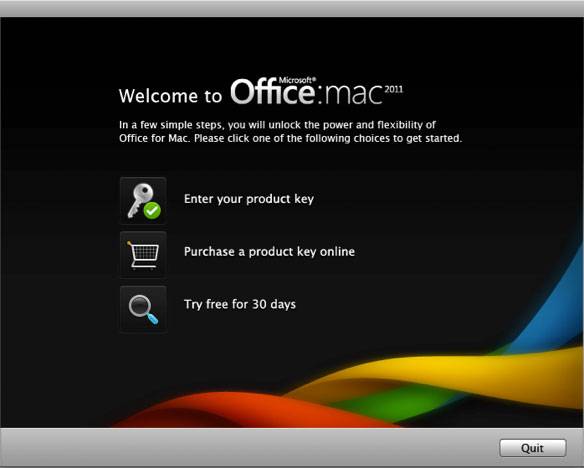
When the first screen of Microsoft Office 2011 installation wizard after sometime, click on "Try Free for 30 days" icon as seen in the below screenshot.
When it is prompted, enter the email address you've used during free download registration form
Click on Activate in order to activate Microsoft Office for Mac 2011 product online and start the 30 days free trial period for your MS Office 2011 installation.
Buy Microsoft Office 2011 for MAC
If you want to buy Office for Mac 2011, please follow the online Microsoft Office for Mac 2011 product sales pages at Office Store
Please note that if you want to buy Office for Mac 2011 online, the availability of onlines purchases is only in countries with Office for Mac Online Store.