
SQL Server administration and T-SQL development, Web Programming with ASP.NET and Javascript, SAP Smartforms and ABAP Programming, Windows 7, Visual Studio and MS Office software Kodyaz Development Resources
Development resources, articles, tutorials, samples, codes and tools for .Net, SQL Server, Vista, etc.


Add Column to Gantt Chart in Microsoft Project 2010

Microsoft Project 2010 enables project managers to customize the Gantt Chart view by adding a new column and specifying the properties of the added column.
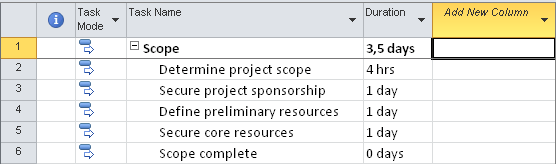
In every Gantt Chart view, the last column of the chart is empty and has a title "Add New Column".
microsoft-project-gantt-chart

Please note : Refer to Microsoft Project 2010 download for free download details.


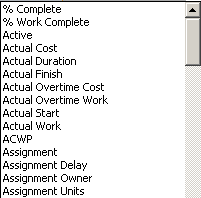
If a project manager clicks on Add New Column a dropdown list will be displayed.
add-new-column-to-microsoft-project-2010-gantt-chart

Actually this long list of items that can be set as the value of the new Gantt Chart column are the properties of the project task.

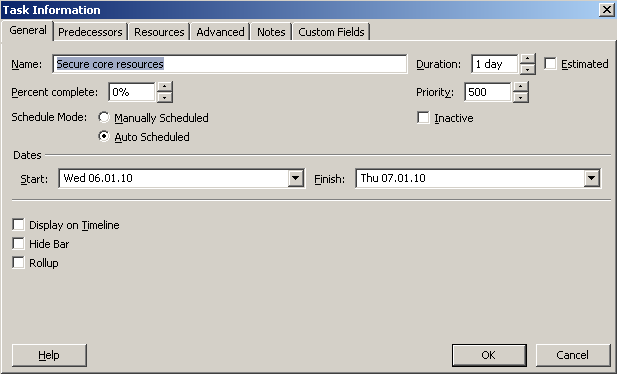
I want to display the new Active / Inactive property of the project management task which is placed on the General tab of the Task Information screen.
microsoft-project-task-information-details

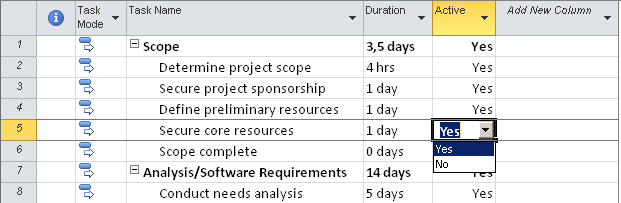
Adding the task property on the Microsoft Project 2010 Gantt Chart view enables project managers to update all tasks related property from the same GUI, without not to open each task information detail screen for a single value update.

The utility to add new column to Gantt Chart enables project managers also to view a specific property of all tasks included in the project easily.
ms-project-2010-gantt-chart-mass-update-on-new-column

Project managers can remove a column from the project Gantt Chart by selecting the column and pressing the Delete key.


Follow Kodyaz on Twitter


Microsoft Office 2010 Tutorials, Articles and Downloads
LinkedIn Outlook Social Connector Download
Download Microsoft Outlook Social Connector for Facebook
Free Download Microsoft Office for Mac 2011
How to Create Master Project, SubProject in Microsoft Project 2010
Microsoft Project 2010 Download Free Trial
Microsoft Project 2010 Team Planner
Add Column to Gantt Chart in Microsoft Project 2010
Copy and Email Timeline in Microsoft Project 2010
Microsoft Project 2010 Activation Error
Microsoft Office 2010 Installation (Professional Plus Edition)
Microsoft PowerPivot Download for Office 2010 Excel
Microsoft Office Redistributable Primary Interop Assemblies Download
Free Download Microsoft Office 2010
How to Save Office Communicator IM Conversation to Communicator Conversation History Folder
Restore Outlook Personel Folder from Outlook .pst (Outlook Data) File


Copyright © 2004 - 2012 Eralper Yilmaz. All rights reserved.
Community Server, by Telligent Systems