Zero Padding - How to Add Leading Zeros in ABAP
Zero padding or to add leading zeros in ABAP is a must for SAP developers in some cases.
When padding zeros to a variable is not done, a concatenation using CONCATENATE ABAP command or a SELECT search statement will not result as desired.
Frequently in ABAP programs, variables are not in the form that are expected.
If it is required to give an example, an Item Number or a POSNR variable which is expected to be 6 character long, may be just equal to 10, 20, or 1, 2, etc.
Using this variable without zero padding in ABAP report might cause problems or may fail.
Padding zeros or to add leading zeros will alter the variable value into the right form according to its data structure.
For example, the following ABAP report will fail to find an existing Sales Order in VBAK SAP table.
The reason is, VBELN sales document number data type is 10 characters long and requires leading zeros.
REPORT Z_ZERO_PADDING.


DATA :

 lv_char10 TYPE char10,

 ls_vbak TYPE vbak.


lv_char10 = '300841'.

SELECT SINGLE * FROM VBAK INTO ls_vbak WHERE vbeln = lv_char10.

IF sy-subrc = 0.

  WRITE 'SUCCESS'.

ELSE.

  WRITE 'FAIL'.

ENDIF.
This time opposite of removing preceding zeros, ABAP developers requires zero padding or to add leading zero in ABAP.
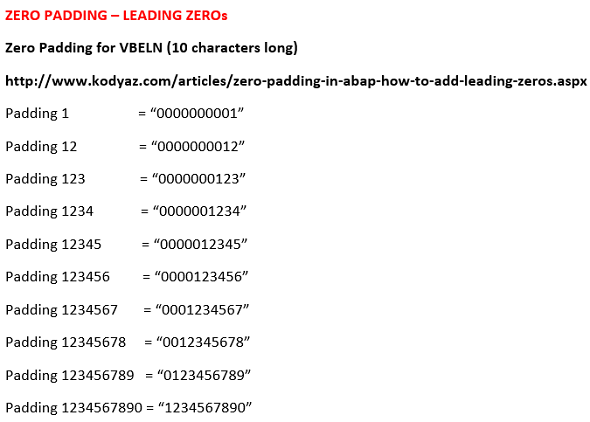
In this ABAP tutorial, ABAP developers can find an example ABAP report demonstrating how padding leading zeros can be implemented.
Actually, there are numerous methods for zero padding in ABAP.
Here is a few of methods which you can use to add leading zero to ABAP variables.
ABAP developers can use UNPACK command in order to unpack an packed field value into a target variable with adding leading zeros.
The ABAP statement "UNPACK lv_char10 TO lv_vbeln.", unpacks the field value '300841' and places it into lv_vbeln variable.
Since lv_vbeln ABAP variable is in VBELN data type which is 10 characters long, the UNPACK ABAP command will add leading zeros (4 zero in this example).
As you see using UnPack ABAP statement is one of the easiest methods for zero padding in ABAP.
REPORT Z_ZERO_PADDING.


DATA :

 lv_char10 TYPE char10,

 lv_vbeln TYPE vbeln,

 ls_vbak TYPE vbak.


lv_char10 = '300841'.


UNPACK lv_char10 TO lv_vbeln.


SELECT SINGLE * FROM VBAK INTO ls_vbak WHERE vbeln = lv_vbeln.

IF sy-subrc = 0.

  WRITE 'SUCCESS'.

ELSE.

  WRITE 'FAIL'.

ENDIF.
Another method for padding zeros is to call function CONVERSION_EXIT_ALPHA_INPUT fm.
If you set the same variable lv_vbeln as Input and Output parameters of ABAP function module CONVERSION_EXIT_ALPHA_INPUT, the variable value will be convert to the desired structure where zero padding is done automatically.
REPORT Z_ZERO_PADDING.


DATA :

 lv_char10 TYPE char10,

 lv_vbeln TYPE vbeln,

 ls_vbak TYPE vbak.


lv_char10 = '300841'.


lv_vbeln = lv_char10.

CALL FUNCTION 'CONVERSION_EXIT_ALPHA_INPUT'

 EXPORTING

   INPUT = lv_vbeln

 IMPORTING

   OUTPUT = lv_vbeln.


SELECT SINGLE * FROM VBAK INTO ls_vbak WHERE vbeln = lv_vbeln.

IF sy-subrc = 0.

  WRITE 'SUCCESS'.

ELSE.

  WRITE 'FAIL'.

ENDIF.
An other method that can be used to add leading zero in ABAP variables is using OVERLAY statement.
Here is an example where "SHIFT ... RIGHT DELETING TRAILING SPACE" is used with "OVERLAY ... WITH ..." for zero padding.
The first ABAP statement "SHIFT lv_vbeln RIGHT DELETING TRAILING SPACE" will change the lv_vbeln value as ' 300841' with four preceding space characters.
And the second command "OVERLAY lv_vbeln WITH '0000000000'" will replace the space characters in lv_vbeln with zero characters.
What is important here is the number of zeros in the Overlay pattern.
The number of zero characters must be as character length of the ABAP variable.
REPORT Z_ZERO_PADDING.


DATA :

 lv_char10 TYPE char10,

 lv_vbeln TYPE vbeln,

 ls_vbak TYPE vbak.


lv_char10 = '300841'.


lv_vbeln = lv_char10.

SHIFT lv_vbeln RIGHT DELETING TRAILING SPACE.

OVERLAY lv_vbeln WITH '0000000000'.


SELECT SINGLE * FROM VBAK INTO ls_vbak WHERE vbeln = lv_vbeln.

IF sy-subrc = 0.

 WRITE 'SUCCESS'.

ELSE.

 WRITE 'FAIL'.

ENDIF.
As you can see zero padding using ABAP can be implemented in various methods. In this ABAP tutorial, I have demonstrated three padding zeros examples for developers. I hope these will answer the question : "How to add leading zeros in ABAP ?".