
xp_regread - RegQueryValueEx() returned error 2, 'The system cannot find the file specified.'
xp_regread extended stored procedure can be used to read registry key values from the registry archive within MS SQL Server.
This t-sql undocumented extended stored procedure is not directly supported by Microsoft. So it is not recommended to use xp_regread on production systems.
It is very common if you are working with xp_regread to get the following sql exception.
The below t-sql error points that the registry entry does not exist, or the parameters you have supplied to the xp_regread statement has some improper values.
RegQueryValueEx() returned error 2, 'The system cannot find the file specified.'

Msg 22001, Level 1, State 1
Let's first start with a proper xp_regread call.
Sample T-SQL Code using xp_regread Extended Stored Procedure
DECLARE @Registry_Value VARCHAR(1000)


EXECUTE xp_regread

  'HKEY_LOCAL_MACHINE',

  'SOFTWARE\Adobe\Acrobat Reader\8.0\Installer',

  'Path',

  @Registry_Value OUTPUT


SELECT @Registry_Value
And the output registry key value is : "C:\Program Files\Adobe\Acrobat 8.0\"
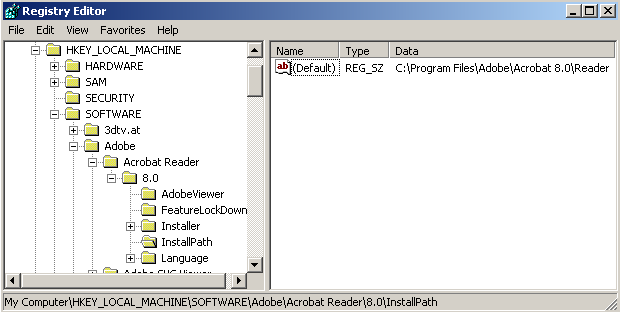
DECLARE @Registry_Value VARCHAR(1000)


EXECUTE xp_regread 'HKEY_LOCAL_MACHINE',

  'SOFTWARE\Adobe\Acrobat Reader\8.0\InstallPath',

  NULL, @Registry_Value OUTPUT


EXECUTE xp_regread 'HKEY_LOCAL_MACHINE',

  'SOFTWARE\Adobe\Acrobat Reader\8.0\InstallPath',

  N'', @Registry_Value OUTPUT


EXEC xp_regread @rootkey = 'HKEY_LOCAL_MACHINE',

  @key = 'SOFTWARE\Adobe\Acrobat Reader\8.0\InstallPath',

  @value_name = N'',

  @value = @Registry_Value OUTPUT


SELECT @Registry_Value
Improper @value_name parameters passed to the xp_regread procedure
But if you execute the below script to get the registry value of the same registry entry like shown above Registry Editor screenshot, you will get some error from the sql engine.
DECLARE @Registry_Value VARCHAR(1000)


EXEC xp_regread @rootkey = 'HKEY_LOCAL_MACHINE',

  @key = 'SOFTWARE\Adobe\Acrobat Reader\8.0\InstallPath',

  @value_name='(Default)',

  @value = @Registry_Value OUTPUT


EXEC xp_regread 'HKEY_LOCAL_MACHINE',

  'SOFTWARE\Adobe\Acrobat Reader\8.0\InstallPath',

  '', @Registry_Value OUTPUT


SELECT @Registry_Value
The sql exception or the t-sql error displayed on the SQL Editor or SQL Server Management Studio will be as follows :
RegQueryValueEx() returned error 2, 'The system cannot find the file specified.'

Msg 22001, Level 1, State 1
You can find information on how you can use the undocumented t-sql stored procedure on MS SQL Server version from SQL Server 2000 to SQL2005 and SQL2008 at SQL xp_regread Extended Stored Procedure.