
SQL Server, T-SQL, ASP.NET, Javascript, SAP, ABAP Programming

Kodyaz Development Resources

Development resources, articles, tutorials, samples, codes and tools for .Net, SQL Server, Vista, etc.
Welcome to Kodyaz Development Resources Sign in | Join | Help


SAP Tutorial - How to Translate Text Module in Smartforms (Translation for Smartforms)


In this SAP tutorial, I'll try to show Smartforms and ABAP developers how to translate text module structures for Smart Forms objects.
Translation of Text Module is a required action for localization of Smart Forms documents.
In this Smartform tutorial there is a short way of translating Text module entries.

SAP Smartforms developers can use 3 types of text on a Text Element on a Smart Forms document :
Text Element ,
Text Module and
Include Text text types.

text-types-used-in-sap-smartforms


Smartforms Text Module Translation using SE63 Standard Translation Environment

As a Smart Form developer, if you are using Smartforms Text Module or Include Text types for texts in smartforms document, you can translate these text into other languages.
I will not deal with how to create text module in this short Smartforms tutorial, but only deal on how to translate text module in Smartforms into different languages.

First, call SAP transaction SE63.

sap-transaction-se63-standard-translation-screen

SE63 SAP translation code will open the Standard Translation Environment initial screen.
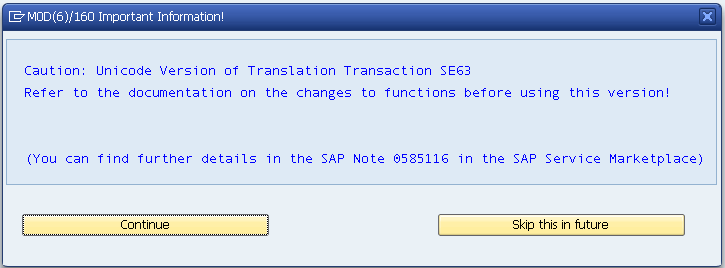
But before displaying the Standard Translation Environment initial screen, you might get the following warning message.
sap-smartforms-Unicode-Version-of-Translation-Transaction-SE63

Caution: Unicode Version of Translation Transaction SE63
Refer to the documentation on the changes to functions before using this version!
(You can find further details in the SAP Note 0585116 in the SAP Service Marketplace)

Please click Continue for the SE63 screen (Standard Translation Environment).
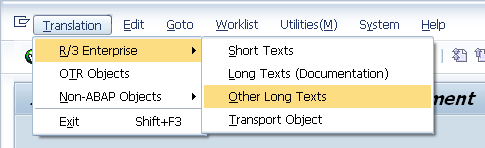
When the SE63 is displayed, in order to translate text module texts used on Smartforms, please follow the following menu options :
Translation > R/3 Enterprise > Other Long Texts
Other long text objects include SAPscript forms, SAP Smart Forms and styles.
sap-smartforms-se63-translation-r3-enterprise-other-long-texts-menu-selection

The next screen in the wizard is the object type selection screen.
For translation of text modules, we will select SSF - SAP Smart Forms.

sap-se63-object-type-selection-for-smartform-text-module

We are now ready to fullfill the task of translating text modules for Smart Forms.
In the following screen, type the name of Text Module in the Object Name input area.
Or you can use standard F4 button to display the list of defined smartforms text modules in the system, if you do not remember the name of the text module.

se63-translation-r3-enterprise-other-long-texts-sap-smart-forms-screen

In this screen, you can arrange the Source Language and Target Language for languages to translate text module from and into.
After you have defined the translation language (target language) and the source language which your text module value already exists and defined in the SAP system, press "Edit" button for translation.

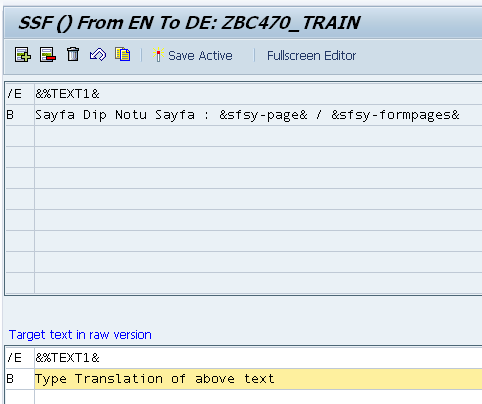
If you correctly define the source language, the Edit button will display a similar screen to shown as below.
You can now enter a translated text for the text module or edit the existing text value for the SSF SAP Smart Form text module.
sap-smartforms-se63-translation-of-text-module-ssf-from-en-to-de

After you have completed the above steps to translate text modules for target languages that you want the smart forms document to be displayed in, SAP users are now able to display the text modules in their languages.
SAP Smart Forms developers can also set the language of the text module on the Smartforms screen where the text module is defined using the Language entry.

I hope SAP Smartform developers will find this smartforms tutorial useful, since I read posts about translation of text module by logging on the system using the target language and then editing the text module as a solution.

For more information and help on SE63 please refer to online SAP Help documentation at Transaction SE63.



SAP Resources

SAP Tutorial

SAP Forums

SAP Tools

SAP Transaction Codes Table


Related SAP Tutorial and ABAP Tutorials

Sales Tables among ABAP Tables (SAP Sales & Distribution SD Tables)
ABAP Function Module rv_invoice_document_read to Read SAP Invoice Data Details
Read SAP Customer Data from KNA1 using kna1_single_reader ABAP Function Module
How to Upload Data to SAP from Excel File using alsm_excel_to_internal_table Function Module
ALV Grid Color - Table Row Background Color in ALV List
Display SAP Documentation using bmenu_show_documentation ABAP Function Module
Multi Color ALV Grid Color Alternate using ALV Layout info_fname Property
How to Debug SmartForms - Debugging SAP SmartForm in ABAP ?
How to Display SAP Transaction in a New Session Or in New Window using ABAP4_Call_Transaction Function Module
How to Open SAP Transaction in New Window Or in New Session using ABAP cc_call_transaction_new_task Function Module
ABAP Tutorial - How to Set Default Date Range in SAP Selection Screen for Date Parameter
ABAP Tutorial - Upload SAP Data to Excel using xxl_simple_api Function Module
How to Download, Upload and Share SAP Favorites Menu
How Find SAP SmartForms Function Module Name
How to Open PopUp_To_Confirm Screen When Delete Function Key is Pressed for Confirmation
SAP Email Send using ABAP efg_gen_send_email Function Call
SAP SmartForms Download as SmartForm PDF Format using WS_DOWNLOAD and cl_gui_frontend_services
SAP Symbols List - Display List of Symbols using ABAP Symbols Report
Display SAP Icons using ABAP Code - SAP Icon List
How to Configure Default ABAP Editor to ABAP WorkBench Front End Editor New
ABAP - Create Hierarchy Tree List using rs_tree_construct, rs_tree_list_display and snodetext
SAP Tutorial for ABAP Developers - Create Number Range Object using SAP Transaction Code SNRO
Create CL_GUI_ALV_GRID ALV Grid Column Header using ABAP Data Element
How to Create SAP Transaction Code using SAP SE93 Transaction
SAP Tutorial - Create Transaction Code for ABAP Module Pools
How to Upload Bitmap Image to SAP using SAP Transaction SE78
SAP Custom Splitter Container cl_gui_splitter_container ABAP Example Code
Message no. 00264 : Status STATUS of the user interface ZREPORT missing
Request Single Spool Record for SmartForms Call within an ABAP Loop using output_options tdnewid
ABAP Tutorial - SAP Split & ABAP Split String Function
Upload Data from Excel File in ABAP using TEXT_CONVERT_XLS_TO_SAP
Display SAP Product Hierarchy using Table T179T VTEXT Field on cl_gui_alv_tree ABAP ALV Tree Object
SAP Product Hierarchy - Example ABAP Program using rv_produkthierarchie_text_get Function
SAP Sales Division SPART Text Description for Different Languages in TSPAT Table
SAP Sales Distribution Channel VTWEG Text Description for Different Languages in TVTWT Table
SAP Sales Organization VKORG Text Description for Different Languages in TVKOT Table
SAP Tutorial - Convert Spool Request to PDF File using RSTXPDFT4 ABAP Report
ABAP Tutorial - How to Generate Random Number for a Given Range of Numbers using RANDOM_I2 Function Module
ABAP Tutorial - How to Generate Random Number for a Given Range of Numbers using QF05_RANDOM_INTEGER
SAP ABAP Tutorial - ALV Grid Example with cl_gui_alv_grid and Screen Painter
How to Create Favorites and Add SAP Transaction Code in SAP Favorites Menu Folder
How to Display Keys in All Dropdown Lists on SAP Screens
SAP EXAM - ABAP EXAM : Free Online Certification SAP Questions & Answers to Tests
How to Delete All Breakpoints within ABAP Code using SAP ABAP Editor (SE80)
SAP Tutorial - How to Translate Text Module in Smartforms (Translation for Smartforms)
SAP Transaction - Create Transaction Code for ABAP Program or Selection Screen
SAP Smartforms Tutorial - Create Smartforms Example
SAP Smartforms - How to Call Smartform within ABAP Program
Smartforms Program Lines Error - Field "TITLE" is unknown. It is neither in one of the specified tables nor defined by a "DATA" statement.
Smartforms System Field &SFSY-JOBPAGES& - Total Number of Pages on a SmartForm document
What is OSS - Online SAP Support Notes ?
Sales Tables among SAP ABAP Tables (Sales & Distribution SD Tables)
ABAP ACE_SOP_CLIENT_READ Function Call to Read System Clients Table t000
Free MaxDB Training on MaxDB Database & Administration from SAP
SAP Download MaxDB Database Software
SAP - ABAP Checkbox in Selection Screen Example
SAP - ABAP Radio Button Selection Screen Example
SAP - ABAP ALV Grid Sample Code using REUSE_ALV_GRID_DISPLAY
ABAP Code to Display SAP Table Contents
How to Remove Preceeding Zeros in ABAP Development
Valid ABAP TRTYP SAP Transaction Type List
How to Find the SAP Transaction Code of the Current Screen Displayed ?
How to Find the Menu Path of a SAP Tansaction Code using SEARCH_SAP_MENU
SAP Smart Forms Tutorial and Smart Forms Resources
SAP Training Cource BC470 Form Printing with SAP Smart Forms
SAP MiniWAS Web Application Server 6.20 and SAP DB Installation for Windows and Troubleshooting
Download SAP GUI for Windows 7.10 and 6.20 from SMP
Introduction to SAP ABAP Programming
Complete List of SAP Modules
SAP Module Abbreviations
Complete List of SAP Sales and Distribution Module (SD) Sub-Modules
List of SAP Standard Material Types
Message Types in Method Return Parameters for SAP Modules
Built-in ABAP Type List or Predefined ABAP Types for SAP Systems


Copyright © 2004 - 2010 Eralper Yilmaz. All rights reserved.
Powered by Community Server, by Telligent Systems