SAP SmartForms Download as SmartForm PDF Format using WS_DOWNLOAD and cl_gui_frontend_services
In this ABAP tutorial, a Smartforms output is generated by the example ABAP report.
Then an SAP Smartform to PDF convert is in sample ABAP codes.
In the following steps Smartforms pdf file is downloaded to the SAP users' client computer.
cl_gui_frontend_services class file_save_dialog method is used to identify the download path and the Smartforms PDF file name.
CALL FUNCTION 'CONVERT_OTF' is used to convert Smartform OTF to PDF format.
At last the Smartforms download is managed by call function WS_DOWNLOAD.
Set Text Elements of the ABAP Report
The ABAP code is given at the end of this ABAP tutorial. But before you activate ABAP report, there are 2 text elements we should define and set values for. These two text elements are labels used on the SAP selection screen. First text element is the title of the selection frame. I chosed the text "Download Smartforms to Folder" as the title of the selection frame block. The second text element is the label of the file folder selection input textbox. These textbox with F4 help is requested open the file folder dialog and the SAP user can freely choose a folder where he or she wants to download the SmartForm in pdf format.
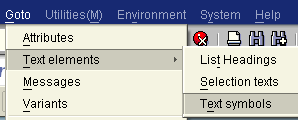
Follow the menu selections : "SAP Menu > Goto > Text elements > Text symbols"
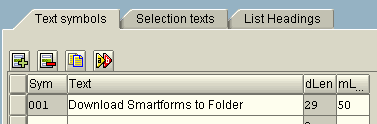
The Text symbols tab is the default active tab. Enter a text for the text symbol 001. This text for text-001 will be used as the label text of the frame on screen where the pdf converted SAP Smart Form document file path information is requested from the user.
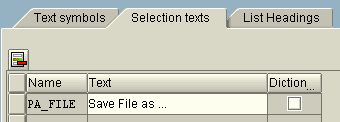
Go to the Selection texts tab. You will see the PA_FILE entry without a text entered. This text will be seen on the GUI of the example ABAP report as the label of the input text area used for file folder path.
This file folder is contains the full path set for the Smart Form document which is convert to pdf format.
Run the ABAP Report, Application Process Flow
After the text symbols and selection texts are defined on the ABAP report Text elements screen, ABAP developers are now ready to run the ABAP program. Press F8 to execute and run the ABAP report prepared to run a Smart Forms report and convert the smartforms output to PDF format and on the next step download the pdf smartform document on client computer into the selected folder.
When the ABAP application is started, the following screen is displayed.
Click on the yellow text area and press F4 or click on the small icon next to the input text area to open the cl_gui_frontend_services screen File Save Dialog screen. The ABAP code to perform the opening of the cl_gui_frontend_services file save dialog screen is triggered from the AT SELECTION-SCREEN ON VALUE-REQUEST FOR event. In the ABAP Report source code, you can see that in value-request for event the PERFORM method calls the SelectFolder form routine.

When the cl_gui_frontend_services class successfully displays the below File Save
Dialog screen, SAP users can choose the file folder and give a name for the pdf
conversion of SmartForms report.
If you look at the ABAP codes where "CALL METHOD cl_gui_frontend_services=>FILE_SAVE_DIALOG" file_save_dialog method of the cl_gui_frontend_services class is called, the
default folder path, default pdf file name of the SAP SmartForms document and
the file type are all set. But as I noted the user can change the download path,
Smartforms pdf file name using the File Save Dialog screen.
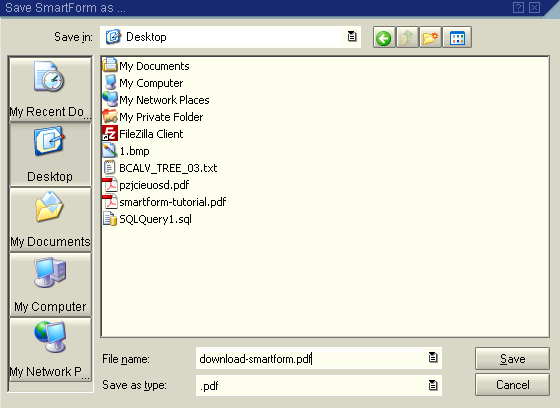
For example, I decided to download the pdf converted SAP Smart Forms output on my computer's desktop with a file name download-smartform.pdf
When you click on the Save button on the cl_gui_frontend_services file save dialog screen, the full path is displayed on the input textbox as shown below.

Now as you can see the SAP Smart Forms download path and the file name is selected.
SAP users are ready to press the F8 button or the  SAP execute icon to start the ABAP program.
After the successfull execution of the sample ABAP program, a Smart Forms output is converted into pdf file format and the resultant pdf file is saved on the target download folder with the desired file name as shown below.
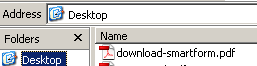
The PDF output of the Smartforms document download-smartform.pdf is created on my computer desktop folder.
You can see the Smartform pdf output on the screenshot.
ABAP Code of the SAP Application which Convert Smart Forms to PDF Format and Downloads to Client
Here is the ABAP code that I use to convert Smartform to PDF file format.
Please pay attention to selection-screen block and selection-screen on value request for ABAP code blocks.
cl_gui_frontend_services class is used to call method file_save_dialog to display the file save dialog screen GUI to the SAP users.
REPORT ZDOWNLOADSM .


DATA : gt_vbak TYPE TABLE OF vbak.


DATA :

  form_name TYPE rs38l_fnam,

  gs_control_params TYPE ssfctrlop,

  gs_output_options TYPE ssfcompop.


DATA :

  t_otfdata TYPE ssfcrescl,

  t_pdf_tab LIKE tline OCCURS 0 WITH HEADER LINE, " SAPscript: Text Lines

  t_otf TYPE itcoo OCCURS 0 WITH HEADER LINE, " OTF Structure

  w_bin_filesize(10) TYPE c.


DATA :

  gv_initialDirectory TYPE STRING,

  gv_filename TYPE STRING,

  gv_path TYPE STRING,

  gv_fullpath TYPE STRING.


CONSTANTS : c_defaultpath(100) TYPE C VALUE 'C:\'.


SELECTION-SCREEN BEGIN OF BLOCK BLOCK-1 WITH FRAME TITLE TEXT-001.

  PARAMETERS : pa_file LIKE RLGRAP-FileName DEFAULT c_defaultpath.

SELECTION-SCREEN END OF BLOCK BLOCK-1.


AT SELECTION-SCREEN ON VALUE-REQUEST FOR pa_file.

  PERFORM u_SelectFolder USING pa_file.


START-OF-SELECTION.

  PERFORM uf_GetReportData.

  PERFORM uf_GetSmartFormModuleName.

  PERFORM uf_RunSmartForm.

  PERFORM uf_ConvertToOTF.

  PERFORM uf_DownloadToClient.

END-OF-SELECTION.


form U_SELECTFOLDER using p_pa_file.


  DATA :

    lv_subrc LIKE sy-subrc,

    lt_it_tab TYPE filetable.


  IF pa_file IS INITIAL.

    gv_initialDirectory = 'C:\'.

  ELSE.

    gv_initialDirectory = pa_file.

  ENDIF.


  " Display File Open Dialog control/screen

  CALL METHOD cl_gui_frontend_services=>FILE_SAVE_DIALOG

  EXPORTING

    WINDOW_TITLE = 'Save SmartForm as ...'

    DEFAULT_EXTENSION = '.pdf'

    DEFAULT_FILE_NAME = 'smartform.pdf'

    FILE_FILTER = '.pdf'

    INITIAL_DIRECTORY = gv_initialDirectory

  CHANGING

    FILENAME = gv_filename

    PATH = gv_path

    FULLPATH = gv_fullpath.


  IF sy-subrc = 0.

    " Write path on input area

    p_pa_file = gv_fullpath.

  ENDIF.


endform. " U_SELECTFOLDER


form UF_DOWNLOADTOCLIENT .


  DATA : lv_filename(128) TYPE C.


  lv_filename = gv_fullpath.


  CALL FUNCTION 'WS_DOWNLOAD'

  EXPORTING

    BIN_FILESIZE = w_bin_filesize

    FILENAME = lv_filename

    FILETYPE = 'BIN'

  TABLES

    data_tab = t_pdf_tab

  EXCEPTIONS

    FILE_OPEN_ERROR = 1

    FILE_WRITE_ERROR = 2

    INVALID_FILESIZE = 3

    INVALID_TYPE = 4

    NO_BATCH = 5

    UNKNOWN_ERROR = 6

    INVALID_TABLE_WIDTH = 7

    GUI_REFUSE_FILETRANSFER = 8

    CUSTOMER_ERROR = 9

    NO_AUTHORITY = 10

    OTHERS = 11.


endform. " UF_DOWNLOADTOCLIENT


form UF_GETREPORTDATA .


  SELECT * FROM vbak INTO TABLE gt_vbak

    WHERE vbeln EQ '0100000004'.


endform. " UF_GETREPORTDATA


form UF_GETSMARTFORMMODULENAME .


  CALL FUNCTION 'SSF_FUNCTION_MODULE_NAME'

  EXPORTING

    formname = 'ZSMARTFORMS_SALES_DOCUMENTS'

  IMPORTING

    fm_name = form_name

  EXCEPTIONS

    no_form = 1

    no_function_module = 2

    OTHERS = 3.


endform. " UF_GETSMARTFORMMODULENAME


form UF_RUNSMARTFORM .


  gs_output_options-tdnoprev = 'X'.

  gs_control_params-no_dialog = 'X'.

  gs_control_params-getotf = 'X'.


  CALL FUNCTION form_name

  EXPORTING

    control_parameters = gs_control_params

    output_options = gs_output_options

    user_settings = 'X'

  IMPORTING

    job_output_info = t_otfdata

  TABLES

    it_vbak = gt_vbak

  EXCEPTIONS

    formatting_error = 1

    internal_error = 2

    send_error = 3

    user_canceled = 4

    OTHERS = 5.


endform. " UF_RUNSMARTFORM


form UF_CONVERTTOOTF .


  t_otf[] = t_otfdata-otfdata[].


  CALL FUNCTION 'CONVERT_OTF'

  EXPORTING

    FORMAT = 'PDF'

    MAX_LINEWIDTH = 132

  IMPORTING

    BIN_FILESIZE = w_bin_filesize

  TABLES

    otf = t_otf

    lines = t_pdf_tab

  EXCEPTIONS

    ERR_MAX_LINEWIDTH = 1

    ERR_FORMAT = 2

    ERR_CONV_NOT_POSSIBLE = 3

    ERR_BAD_OTF = 4.


endform. " UF_CONVERTTOOTF
Let me explain the above ABAP code in brief.
There are exactly 5 PERFORM calls to functions within the ABAP program.
These Perform calls are :
PERFORM uf_GetReportData.
PERFORM uf_GetSmartFormModuleName.
PERFORM uf_RunSmartForm.
PERFORM uf_ConvertToOTF.
PERFORM uf_DownloadToClient.
PERFORM uf_GetReportData.
In this function SAP database tables are queried for the raw data of the SAP Smart Forms report.
The result set of the ABAP SELECT query is stored in an ABAP internal table.
PERFORM uf_GetSmartFormModuleName.
This function contains a very basic Function Call to get the function name of the SAP Smart Forms report.
CALL FUNCTION 'SSF_FUNCTION_MODULE_NAME' is the main ABAP code of this code block.
ssf_function_module_name is always called in ABAP codes to get the function module name of the SAP Smart Forms report using the name of the Smartforms report.
PERFORM uf_RunSmartForm.
In this function the Smart Forms report is executed using CALL FUNCTION form_name function call.
Before the SAP Smartform document is generated, Smartforms output options and control parameter are set to value so that there will be no dialog screen, no print preview screen and the output will be generated in otf format.
PERFORM uf_ConvertToOTF.
The important ABAP code in this function is the CALL FUNCTION 'CONVERT_OTF' function call.
The OTF data is converted to PDF format in this stage of the ABAP report.
The code to convert Smartforms OTF output to PDF takes place here with call function Convert_OTF.
PERFORM uf_DownloadToClient.
ABAP code CALL FUNCTION 'WS_DOWNLOAD' enables the pdf output of the SAP Smartforms document to be downloaded to the client computer with given file folder, file name, etc parameters.
The ABAP function WS_DOWNLOAD is marked as obsolete but still works successfully in order to download Smartforms pdf file on users' computers.