SAP ABAP Tutorial - ALV Grid Example with cl_gui_alv_grid and Screen Painter
This ABAP ALV tutorial includes an example ABAP program which lists VBAK and VBAP sales order items between given two VBELN numbers on an SAP screen on ALV grid using cl_gui_alv_grid class.
Tutorial includes a screenshot from the SAP program showing the output of the example ABAP program that filters data from VBAK and VBAP transparent tables and displays data on an ABAP ALV grid control cl_gui_alv_grid placed in a custom container on a dynpro screen.
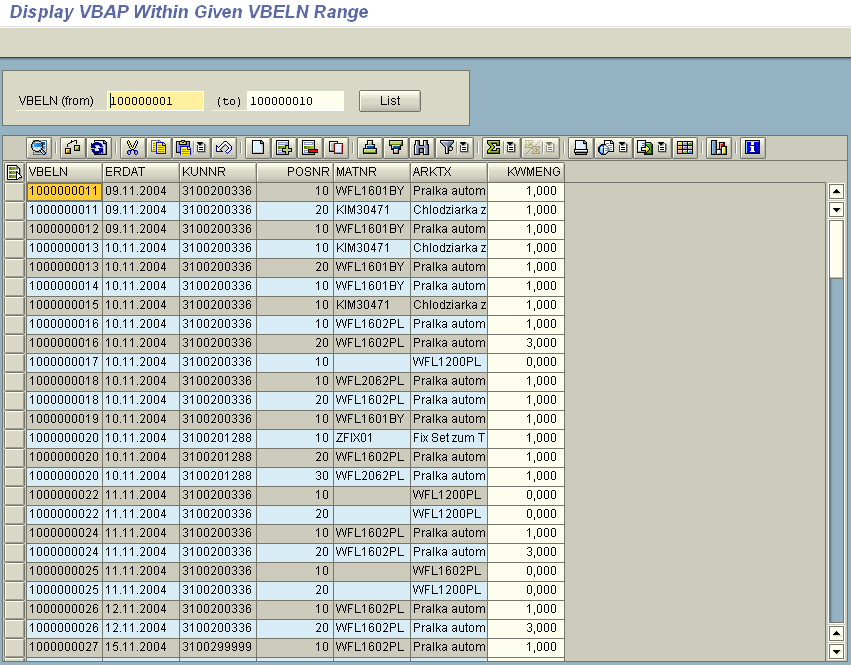
Display data using cl_gui_alv_grid in ABAP programming
Let's begin with the source code of the example ABAP report codes.
Following ABAP codes include required data definitions, custom container and ALV grid object definitions as well as a call to SAP Dynpro screen to display ALV table with populated data.
REPORT ZLIST_VBAP LINE-SIZE 160.


DATA :

 gr_vbeln TYPE RANGE OF vbak-vbeln,

 grs_vbeln LIKE LINE OF gr_vbeln.


DATA:

 gs_fieldcatalog TYPE lvc_s_fcat OCCURS 0,

 gv_fcat LIKE LINE OF gs_fieldcatalog,

 gs_layout TYPE lvc_s_layo.


TYPES :

 BEGIN OF gty_item,

  mandt LIKE vbak-mandt,

  vbeln LIKE vbak-vbeln,

  erdat LIKE vbak-erdat,

  kunnr LIKE vbak-kunnr,

  posnr LIKE vbap-posnr,

  matnr LIKE vbap-matnr,

  arktx LIKE vbap-arktx,

  kwmeng LIKE vbap-kwmeng,

  desc_text LIKE zvbap-desc_text,

 END OF gty_item,

 BEGIN OF gty_vbak,

  mandt LIKE vbak-mandt,

  vbeln LIKE vbak-vbeln,

  erdat LIKE vbak-erdat,

  kunnr LIKE vbak-kunnr,

 END OF gty_vbak,

 BEGIN OF gty_vbap,

  vbeln LIKE vbap-vbeln,

  posnr LIKE vbap-posnr,

  matnr LIKE vbap-matnr,

  arktx LIKE vbap-arktx,

  kwmeng LIKE vbap-kwmeng,

 END OF gty_vbap.


DATA :

 gs_item TYPE gty_item,

 gt_item TYPE TABLE OF gty_item.


DATA :

 gs_vbak TYPE gty_vbak,

 gt_vbak TYPE TABLE OF gty_vbak,

 gs_vbap TYPE gty_vbap,

 gt_vbap TYPE TABLE OF gty_vbap.


DATA :

 g_Container TYPE scrfname VALUE 'CC_CONTAINER_GRID',

 g_Custom_Container TYPE REF TO CL_GUI_CUSTOM_CONTAINER,

 g_Grid TYPE REF TO CL_GUI_ALV_GRID.


DATA :

 OK_CODE LIKE sy-ucomm,

 SAVE_OK LIKE sy-ucomm.


START-OF-SELECTION.


 CALL SCREEN 100.
Let's continue reviewing the sample ABAP program code with the screen 100 dynpro object.
Double click on 100 at ABAP statement "call screen 100" to create the dynpro screen.
In the below screenshot you can see the layout view of the screen on the SAP Screen Painter editor.
This Screen Painter example shows a Custom Control  cl_gui_custom_container object and the ALV grid object cl_gui_alv_grid placed in that container.
If you double click on the custom control to display the element attributes, you can name the control as "CC_CONTAINER_GRID"
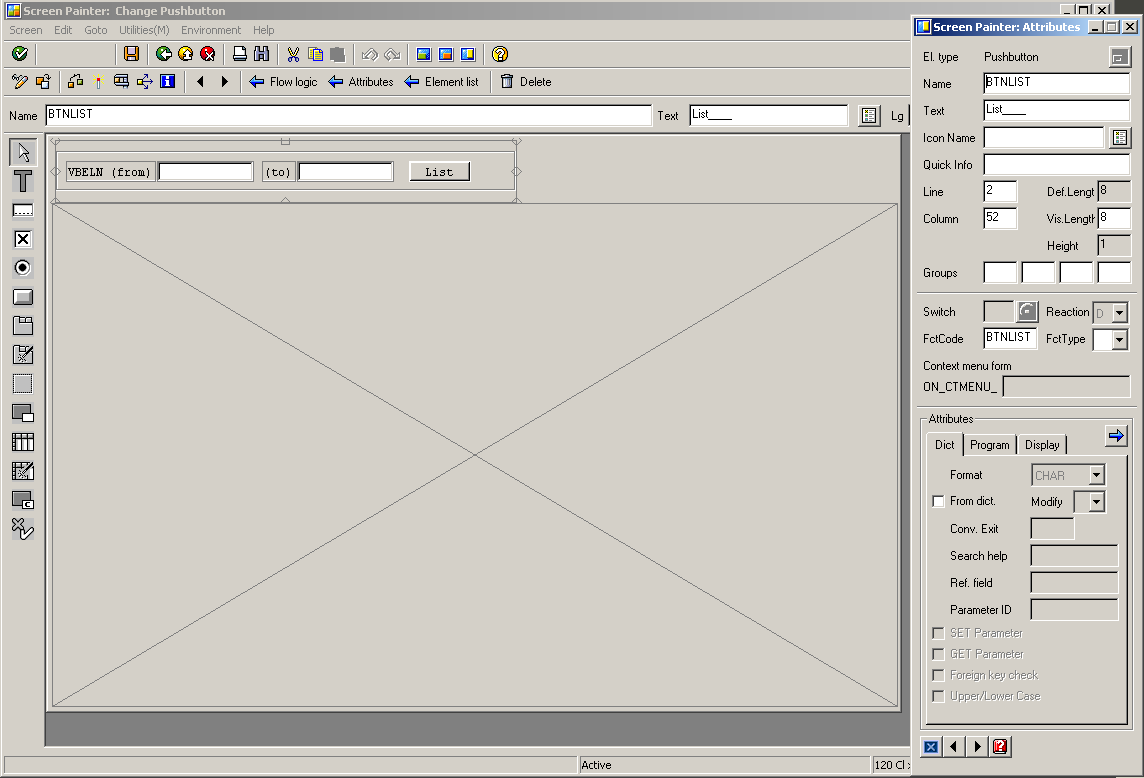
Please pay attention to the FctCode (function code) of the Button object BTNLIST. The FctCode is set as "BTNLIST" and will be controlled in the PAI (Process After Input) module with the ABAP CASE statement controlling the value of OK_CODE.
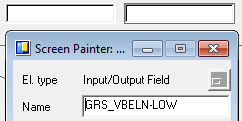
I named the two text box objects which I'll use to filter sales order documents according to document number VBELN fields as follows:
The first text element name: GRS_VBELN-LOW
Second text element name as: GRS_VBELN-HIGH
One last step for the screen 100 configuration is assigning OK_CODE variable by adding it to the general attributes in Element list of the screen.
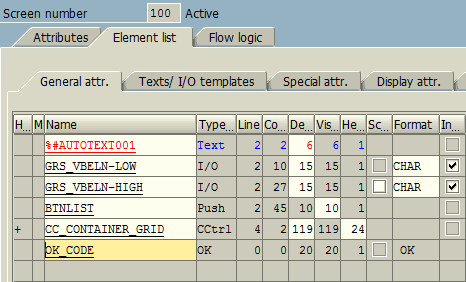
Add below Process Before Output (PBO) module code or ABAP code block of the Screen 100 after all above screen element attributes are set.
MODULE STATUS_0100 OUTPUT.


 SET PF-STATUS 'MAINSTATUS'.

 SET TITLEBAR 'TITLE'.


 IF g_Custom_Container IS INITIAL.


  " Create CONTAINER object with reference to container name in the screen

  CREATE OBJECT g_Custom_Container EXPORTING CONTAINER_NAME = g_Container.

  " Create GRID object with reference to parent name

  CREATE OBJECT g_Grid EXPORTING I_PARENT = g_Custom_Container.


  PERFORM u_prepare_fieldcatalog.

  gs_layout-ZEBRA = 'X'.

  "gs_layout-edit = 'X'. " Makes all Grid editable


  " SET_TABLE_FOR_FIRST_DISPLAY

  CALL METHOD g_Grid->SET_TABLE_FOR_FIRST_DISPLAY

   EXPORTING

    is_layout = gs_layout

   CHANGING

    it_fieldcatalog = gs_fieldcatalog

    IT_OUTTAB = gt_item. " Data


 ELSE.

  CALL METHOD g_Grid->REFRESH_TABLE_DISPLAY.

 ENDIF.


ENDMODULE. " STATUS_0100 OUTPUT
Double click on TITLE to create a new title bar.
Also double click on MAINSTATUS to create a PF-STATUS object.
It is enough for this ABAP tutorial to navigate on the ABAP program if you define below standard toolbar commands.
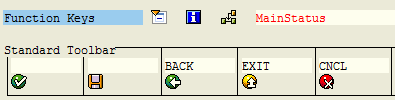
And you can use below Process After Input (PAI) module code or ABAP code block of the Screen 100.
MODULE USER_COMMAND_0100 INPUT.


 SAVE_OK = OK_CODE.

 CLEAR OK_CODE.


 CASE SAVE_OK.

  WHEN 'EXIT' OR 'BACK' OR 'CNCL'.

   LEAVE PROGRAM.

  WHEN 'BTNLIST'.

   PERFORM u_filter_vbak.

  WHEN OTHERS.

 ENDCASE.


ENDMODULE. " USER_COMMAND_0100 INPUT
In U_FILTER_VBAK, the required ABAP code to select data from related data dictionary objects, tables according to the given criteria takes place.
Within this ABAP code block, the necessary internal tables are populated with data from SAP database.
FORM U_FILTER_VBAK .


 REFRESH: gt_vbak, gt_vbap, gt_item.


 " Define Range Criteria

 grs_vbeln-SIGN = 'I'.

 grs_vbeln-OPTION = 'BT'.

 APPEND grs_vbeln to gr_vbeln.


 CHECK gr_vbeln[] IS NOT INITIAL.

 SELECT mandt vbeln erdat kunnr

  FROM vbak INTO TABLE gt_vbak

  WHERE vbeln IN gr_vbeln.


 CHECK gt_vbak[] IS NOT INITIAL.

 SELECT vbeln posnr matnr arktx kwmeng

  FROM vbap INTO TABLE gt_vbap

  FOR ALL ENTRIES IN gt_vbak

  WHERE vbeln EQ gt_vbak-vbeln.


 IF gt_vbak[] IS NOT INITIAL.


  LOOP AT gt_vbap INTO gs_vbap.


   READ TABLE gt_vbak INTO gs_vbak WITH KEY vbeln = gs_vbap-vbeln.


   gs_item-mandt = gs_vbak-mandt.

   gs_item-vbeln = gs_vbak-vbeln.

   gs_item-erdat = gs_vbak-erdat.

   gs_item-kunnr = gs_vbak-kunnr.

   gs_item-posnr = gs_vbap-posnr.

   gs_item-matnr = gs_vbap-matnr.

   gs_item-arktx = gs_vbap-arktx.

   gs_item-kwmeng = gs_vbap-kwmeng.


   APPEND gs_item TO gt_item.


   CLEAR gs_item.

   CLEAR gs_vbak.

   CLEAR gs_vbap.

  ENDLOOP.


 ENDIF.


ENDFORM. " U_FILTER_VBAK
And below ABAP developers can see how I build the field catalog required for displaying data on ALV grid. The field catalog layout is used as a parameter for the ALV grid object's SET_TABLE_FOR_FIRST_DISPLAY method and forms the columns and display structure of the internal data.
FORM U_PREPARE_FIELDCATALOG .


 CLEAR gv_fcat.

 gv_fcat-fieldname = 'MANDT'.

 gv_fcat-tabname = 'VBAP'.

 gv_fcat-col_pos = 0.

 gv_fcat-coltext = 'MANDT'.

 gv_fcat-no_out = 'X'. " Do not Display Column

 INSERT gv_fcat INTO TABLE gs_fieldcatalog.


 CLEAR gv_fcat.

 gv_fcat-fieldname = 'VBELN'.

 gv_fcat-tabname = 'VBAP'.

 gv_fcat-col_pos = 1.

 gv_fcat-coltext = 'VBELN'.

 INSERT gv_fcat INTO TABLE gs_fieldcatalog.


 CLEAR gv_fcat.

 gv_fcat-fieldname = 'ERDAT'.

 gv_fcat-tabname = 'VBAP'.

 gv_fcat-col_pos = 2.

 gv_fcat-coltext = 'ERDAT'.

 INSERT gv_fcat INTO TABLE gs_fieldcatalog.


 CLEAR gv_fcat.

 gv_fcat-fieldname = 'KUNNR'.

 gv_fcat-tabname = 'VBAP'.

 gv_fcat-col_pos = 3.

 gv_fcat-coltext = 'KUNNR'.

 INSERT gv_fcat INTO TABLE gs_fieldcatalog.


 CLEAR gv_fcat.

 gv_fcat-fieldname = 'POSNR'.
 gv_fcat-tabname = 'VBAP'.

 gv_fcat-col_pos = 4.

 gv_fcat-coltext = 'POSNR'.

 INSERT gv_fcat INTO TABLE gs_fieldcatalog.


 CLEAR gv_fcat.

 gv_fcat-fieldname = 'MATNR'.

 gv_fcat-tabname = 'VBAP'.

 gv_fcat-col_pos = 5.

 gv_fcat-coltext = 'MATNR'.

 INSERT gv_fcat INTO TABLE gs_fieldcatalog.


 CLEAR gv_fcat.

 gv_fcat-fieldname = 'ARKTX'.

 gv_fcat-tabname = 'VBAP'.

 gv_fcat-col_pos = 6.

 gv_fcat-coltext = 'ARKTX'.

 INSERT gv_fcat INTO TABLE gs_fieldcatalog.


 CLEAR gv_fcat.

 gv_fcat-fieldname = 'KWMENG'.

 gv_fcat-tabname = 'VBAP'.

 gv_fcat-col_pos = 7.

 gv_fcat-coltext = 'KWMENG'.

 gv_fcat-EDIT = 'X'. " Makes field editable in Grid

 INSERT gv_fcat INTO TABLE gs_fieldcatalog.


 CLEAR gv_fcat.

 gv_fcat-fieldname = 'DESC_TEXT'.

 gv_fcat-tabname = 'VBAP'.

 gv_fcat-col_pos = 7.

 gv_fcat-coltext = 'DESC_TEXT'.

 gv_fcat-no_out = 'X'.

 INSERT gv_fcat INTO TABLE gs_fieldcatalog.


ENDFORM. " U_PREPARE_FIELDCATALOG
The field catalog prepares ALV grid columns for display and sets properties of table columns.
For example, there are 7 columns displayed on the first screenshot of this ABAP tutorial.
But we have 9 fields in our field catalog.
ABAP programmers can notice field catalog property "NO_OUT" is used to hide a field on the ALV grid. "no_out" enables programmers to set a column hidden on the ALV grid display but the values are still accessible when a click or double click event is triggered. So if ABAP developer needs to hide a column on ALV grid, field catalog structure no_out field can be set to "X" to hide as seen in above sample code.
I hope I could help ABAP developers with a start-to-end sample code which they can use to display data on an ALV grid table on their SAP Dynpro screens.