
How to delete duplicate records or rows among identical rows in a table where no primary key exists
It is a very common situation that you may find yourself against a problem dealing with deletion of dublicate records in a database table. This is a real problem if the records are identical even for values in each column. So you can not distinguish one row from the other. This problem may occur on any table if the table does not have a unique index or an identity column. Unique indexes guarantees that columns within the index has no dublicate values so each row in the table has also no dublicates. Identity columns are columns whose numeric values are generated automatically in a sequential way. So in a way using identity columns will also provide a uniqueness among the rows of a table as well as in the identity column values.
But now we will deal with a situation where we can not avoid dublicate records in a table and try to remove or delete the dublicate rows from the database table.
There are three methods that we can get use of them in order to delete dublicates in a table. One method is using the SET ROWCOUNT t-sql command. And the second method uses the TOP tsql command. But if you open the SQL Server 2005 Books Online (BOL) you will see a note indicating that SET ROWCOUNT will not affect DELETE, INSERT, and UPDATE statements in the next release of SQL Server (probably in Katmai). So if you are writing your sql codes also for next versions of SQL Server, then you should prefer choosing the second method and use TOP in your codes. And the third method is adding an identity column to the table to distinguish identical rows in the table. This is a small tricky method :)
Before I explain both methods, it is better to create a table that will help us simulate the problem.
CREATE TABLE Users

(

 FirstName nvarchar(50),

 LastName nvarchar(50)

)

GO


INSERT INTO Users (FirstName, LastName) VALUES (N'Eralper',N'Yilmaz')

INSERT INTO Users (FirstName, LastName) VALUES (N'Elvis',N'Presley')

INSERT INTO Users (FirstName, LastName) VALUES (N'Red',N'Kit')

INSERT INTO Users (FirstName, LastName) VALUES (N'Jane',N'Fonda')

INSERT INTO Users (FirstName, LastName) VALUES (N'Red',N'Kit')

INSERT INTO Users (FirstName, LastName) VALUES (N'James',N'White')

INSERT INTO Users (FirstName, LastName) VALUES (N'Alan',N'Black')

INSERT INTO Users (FirstName, LastName) VALUES (N'Elvis',N'Presley')

INSERT INTO Users (FirstName, LastName) VALUES (N'Jane',N'Fonda')

INSERT INTO Users (FirstName, LastName) VALUES (N'Elvis',N'Presley')

INSERT INTO Users (FirstName, LastName) VALUES (N'Jane',N'Fonda')

INSERT INTO Users (FirstName, LastName) VALUES (N'Elvis',N'Presley')
If you run a SELECT command on the table Users, the result set return from the below sql command will be as shown in the table
SELECT * FROM Users
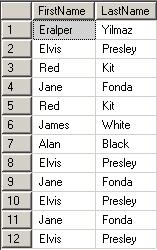
You will notice that in our sample database table some records have been repeated two times, three times and even four times. Now we aim to get rid of the dublicate rows in the Users table.
We can not succeed deleting dublicate records by simply running a DELETE FROM sql statement like shown below
DELETE FROM Users WHERE FirstName = N'Elvis' AND LastName = N'Presley'
This will delete all the rows that have firstname value as Elvis and lastname equal to Presley which means all of the four records will be deleted.
Method 1: SET ROWCOUNT
Syntax for SET ROWCOUNT is as follows:
SET ROWCOUNT { number | @number_var }
SET ROWCOUNT limits the sql server engine to process a specific number of rows. So the process stops after the defined number of rows are reached. The default value for ROWCOUNT is 0 which means no limit on the returning result set so all rows are returned. After a ROWCOUNT command is run and all processes are completed, you can also set the ROWCOUNT to 0 to turn off this option.
If we return back to our sample, in order to delete four times repeated rows, we can set the ROWCOUNT value to 3
SET ROWCOUNT 3

DELETE FROM Users WHERE FirstName = N'Elvis' AND LastName = N'Presley'

SET ROWCOUNT 0

-- (3 row(s) affected)
After running the above DELETE FROM command with SET ROWCOUNT statement, the last status of the table Users as below.
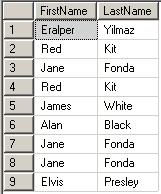
We are successfull to delete the identical rows with the row number 9 in the above picture.
If you want to delete the identical records automatically we can use a cursor. It is important that while you are declaring the cursor for dublicate rows, you should select the count of identical rows minus one, since we want one of the dublicated records exist in the table after delete processes.
You should also pay attention to the SET ROWCOUNT commands around the DELETE FROM command in the body of the cursor.
DECLARE @Count int

DECLARE @FirstName nvarchar(50)

DECLARE @LastName nvarchar(50)


DECLARE dublicate_cursor CURSOR FAST_FORWARD FOR

SELECT FirstName, LastName, Count(*) - 1

FROM Users

GROUP BY FirstName, LastName

HAVING Count(*) > 1


OPEN dublicate_cursor


FETCH NEXT FROM dublicate_cursor INTO @FirstName, @LastName, @Count


WHILE @@FETCH_STATUS = 0

BEGIN


SET ROWCOUNT @Count

DELETE FROM Users WHERE FirstName = @FirstName AND LastName = @LastName

SET ROWCOUNT 0


FETCH NEXT FROM dublicate_cursor INTO @FirstName, @LastName, @Count

END


CLOSE dublicate_cursor

DEALLOCATE dublicate_cursor
Method 2: TOP
A second method we can use while removing dublicate records from Users table is using the TOP expression in DELETE statement. With the release of SQL Server 2005, as an T-SQL enhancement TOP expression now takes a variable where else in SQL Server 2000 TOP was expecting a constant numeric value. This is very useful since if we decide to use a cursor, etc to delete all dublicates once, we may use a variable with the TOP expression.
If we return back to our original sample data in the Users table, we can run a similar command to remove two of the three identical records having firstname equal to Jane and last name equal to Fonda
DELETE TOP (2) FROM Users

WHERE FirstName = N'Jane' AND LastName = N'Fonda'
If you have not used the (n) syntax, you shoul get the following error; don't worry, just use the paranthesis.
Msg 102, Level 15, State 1, Line 2

Incorrect syntax near '2'.
You can guess that we can use this DELETE TOP combination within a cursor in order to remove all the dublicated records leaving only one of them in the sample table. Here is the cursor that we can use:
DECLARE @Count int

DECLARE @FirstName nvarchar(50)

DECLARE @LastName nvarchar(50)


DECLARE dublicate_cursor CURSOR FAST_FORWARD FOR

SELECT FirstName, LastName, Count(*) - 1

FROM Users

GROUP BY FirstName, LastName

HAVING Count(*) > 1


OPEN dublicate_cursor


FETCH NEXT FROM dublicate_cursor INTO @FirstName, @LastName, @Count


WHILE @@FETCH_STATUS = 0

BEGIN


DELETE TOP(@Count) FROM Users WHERE FirstName = @FirstName AND LastName = @LastName


FETCH NEXT FROM dublicate_cursor INTO @FirstName, @LastName, @Count

END


CLOSE dublicate_cursor

DEALLOCATE dublicate_cursor
Again I want to point to the issue that ROWCOUNT will not be considered in the next releases of SQL SERVER. You can find this information in the BOL on topics about ROWCOUNT and TOP. You can refer to ms-help://MS.SQLCC.v9/MS.SQLSVR.v9.en/udb9/html/50705caa-4d0a-490f-92a4-75ece96e0a54.htm for more information. I also copied the important note from BOL to here:
Using SET ROWCOUNT will not affect DELETE, INSERT, and UPDATE statements in the next release of SQL Server. Avoid using SET ROWCOUNT with DELETE, INSERT, and UPDATE statements in new development work, and plan to modify applications that currently use it. We recommend that DELETE, INSERT, and UPDATE statements that currently are using SET ROWCOUNT be rewritten to useTOP.
Method 3: Adding an IDENTITY column
A third method can be adding an identity column to the table in order to distinguish all rows from each other. Of course, if you do not have the permissions to alter the table in order to add a new column, this method can not be implemented.
Run the below sql command to add a new column to the Users table, which will also fill the newly added column Id with integer values in sequential order and will distinguish each record from its identical ones.
ALTER TABLE Users ADD Id int IDENTITY(1,1)
After you run the above command, Users table will be as below:
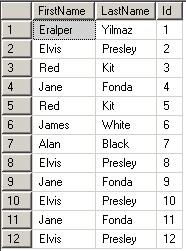
Now it is easy to delete dublicates by using the Id column. For example, for dublicates of row with Id 8, we can run the below command
DELETE FROM Users WHERE Id IN (2,10,12)
And now let's look how we can automatically delete dublicates in this situation. We can use a Common Table Expression (CTE) to make a change and use a CTE instead of using a cursor. Here is the CTE (common table expression) sample that will delete the dublicates in our Users table.
WITH Dublicates_CTE(FirstName, LastName, Id)

AS

(

SELECT FirstName, LastName, Min(Id) Id

FROM Users

GROUP BY FirstName, LastName

HAVING Count(*) > 1

)

DELETE FROM Users

WHERE Id IN (

SELECT Users.Id

FROM Users

INNER JOIN Dublicates_CTE

ON Users.FirstName = Dublicates_CTE.FirstName

AND Users.LastName = Dublicates_CTE.LastName

AND Users.Id <> Dublicates_CTE.Id

)
It is important to note that CTEs (Common Table Expressions) are also new enhancements in t-sql with the new release of SQL Server, SQL Server 2005. So the above sql statement will not run on SQL Server 2000 databases. For more samples and definition on CTEs you can read the article titled Common Table Expression.
After you have done, you can drop the identity column Id by running an ALTER TABLE command as shown below:
ALTER TABLE Users DROP COLUMN Id
I guess, you have now a few techniques that you can use while dealing with dublicate records or rows in your sql server databases.
Additional Tutorials for Dublicate Rows
If you have rows that differ from each other, you can use an other method to delete duplicate rows in a table.
For example if you have inserted date column and you want to keep the first rows inserted into the table by ordering due to the insert date column, you can use the ROW_NUMBER() OVER (PARTITION BY ... ORDER BY ...) method.
You can find an other tutorial titled Use ROW_NUMBER() OVER (PARTITION BY ... ORDER BY ...) to Delete Duplicate Rows in SQL Table among Kodyaz SQL articles for developers.