
How to Create a SQL Server 2005 Database Snapshot
Microsoft SQL Server Database Administrators has a new feature with the Microsoft SQL Server 2005 Edition which is database snapshots.
Database snapshot is new with MS SQL Server 2005 and only available with Microsoft SQL Server 2005 Enterprise Edition.
SQL Server database administration and database development with SQL Server especially for SQL Reporting will be easier with MS SQL Server database snapshots.
A database snapshot can be described as a photo of a database.
Database snapshots are read-only so we can easily say that their main usage areas cover mostly the reporting applications.
Database snaphots are one to one the same of the original database at the time when the snapshot is created.
After a snapshot is created it stays as a static view of the original database at the time of snapshot creation.
A snapshot can persists until it is dropped using DROP DATABASE command.
Also multiple snapshots can be created with different names of a database called as source database.
In order to create a MS SQL Server database snapshot, CREATE DATABASE statement is used.
Microsoft SQL Server Database Snapshot Example
Here is a sample database snapshot create script of the sample database AdventureWorks
First, in order to place the data files of the snapshot, we should define the physical path of the container folder
We can use the source database 's data folder for the same purpose for snapshot database
select physical_name from sys.database_files WHERE file_id = 1
The above query will display where the .mdf file exists. So we can use the same folder.
I'm going to use "D:\Program Files\Microsoft SQL Server\MSSQL.1\MSSQL\Data\"
Considering the below note from Books On Line;
When you create a database snapshot, the CREATE DATABASE statement cannot reference log files, offline files, restoring files, and defunct files.
I run the below select statement to get a list of data files that I should reference
select name from sys.database_files WHERE type_desc = 'ROWS'
The returned row set only contains the "AdventureWorks_Data"
Now, we are ready to create a snapshot of the source database.
CREATE DATABASE AdventureWorks_SS ON

(

NAME = AdventureWorks_Data,

FILENAME = 'D:\Program Files\Microsoft SQL Server\MSSQL.1\MSSQL\Data\AdventureWorks_Data.ss'

)

AS SNAPSHOT OF AdventureWorks
After the above command is completed successfully, we can see the snapshot database in the Database Snapshots folder of the SQL Server Instance
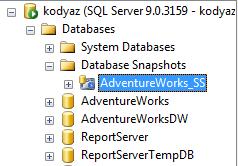
In order to delete or remove a database snapshot after it is not needed any more, you can DROP it by using the DROP DATABASE command.
DROP DATABASE AdventureWorks_SS
Note that if database snapshot creation fails, the snapshot is in suspect status and it should be deleted or dropped.
I believe, sql server programmers as well as database administrators will benefit more from Microsoft database snapshots.
Especially when MS SQL Server performance is an issue. Than Microsoft SQL Server snapshots can be a solution especially for distinguishing reporting databases from the transactional production databases.
Administrators or developers do not need to backup and restore SQL databases for creating a second database for MS SQL Server Reporting Services, for instance.
For additional tutorials on creating SQL databases please refer to SQL tutorial titled How to Create a Database in SQL Server 2005.