
Using the ASP.NET 2.0 Menu Control with Site Maps
There are two ways to set up and configure the Asp.NET 2.0 Menu control.
Adding the Menu Control on the web page
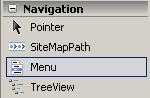
First of all, we need to place the new ASP.NET 2.0 Menu control to a new ASP.NET page from the toolbox window Navigation section by drag and drop method.
Choosing Data Source for Menu Control
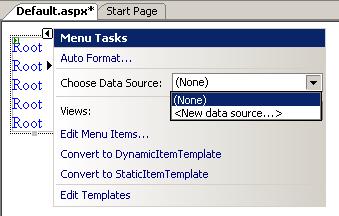
When the Menu control is placed on the blank asp.net page the Tasks wizard window is opened as shown below. The menu items of the Menu control can be supplied by two methods as I have noted above. These methods are identified by the data sources of the Menu control. If you open the Data Source drop down in the Menu Tasks window, you will see an empty list. To add a new data source click the <New data source...> menu item.
The first screen displayed while a data source is being selected, is the screen where the type of the data source is selected.
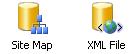
For a Menu control, two types of data sources are available; Site Map and XML File data source types.
Site Map and XML File data source types.
Let's begin by selecting the Site Map data source type for our simple menu control.
Before starting working on Menu control with Site Map data source, we should prepare our web site's Web.sitemap file. SiteMap is a new feature of ASP.NET 2.0 which helps implementing a map of your sites web sections and pages that will help your visitors navigate to desired pages easier and quicker. SiteMaps are in a summary of your sites navigation structure.
Creating a Site Map for the Web Site
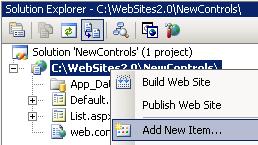
To add a SiteMap on your web site project using Visual Studio 2005, right click the web site project name in the solution explorer window and open the context menu. From the menu select the Add New Item...
When the Add New Item dialog screen is displayed, select the Site Map among the other Visual Studio installed templates. Note that Site Map is described as a file used to create a site map. Then give the name Web.sitemap as suggested by default and click Add to finish the process.
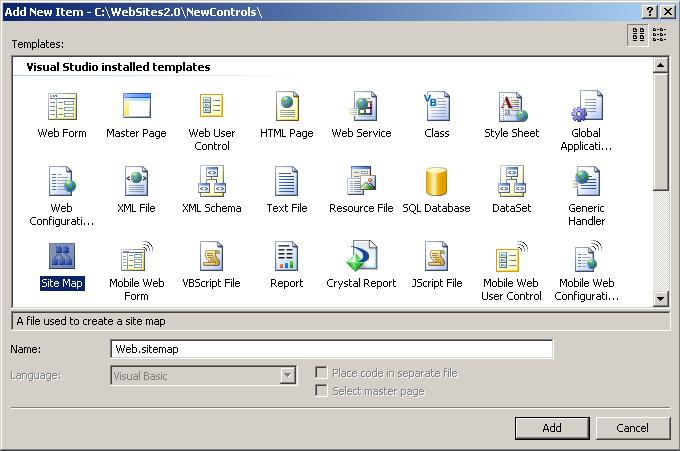
Note that if you give a name different than Web.sitemap, the application will not be able to define the Site Map file correctly and this will cause errors during run-time. For example if we use a name for the .sitemap file like MySite.sitemap and configure our navigation web controls to use the Site Map as we will do for Menu control in the following steps we may have such an error:
The file web.sitemap required by XmlSiteMapProvider does not exist.
This error is thrown while the following method is running and the CheckSiteMapFileExists method is looking for a specific file name web.sitemap
System.Web.XmlSiteMapProvider.CheckSiteMapFileExists()
Continue with configuring the Menu Control
Now we are ready to continue with setting up the Menu control for our web page. We have created the site map file web.sitemap for our web site. We have placed the menu control on the page and selected the Site Map as the data source type.
You are requested to enter an ID for the data source with a default suggested ID name SiteMapDataSource1 for the Site Map type data source. Make no change or you can give a more descriptive name and continue.
The source of the Asp.NET page related with Menu control will be now as below:
<asp:Menu ID="Menu1" runat="server" DataSourceID="SiteMapDataSource1"></asp:Menu>

<asp:SiteMapDataSource ID="SiteMapDataSource1" runat="server" />
The DataSourceID property of the Menu control is mapping to the SiteMapDataSource control placed on the page.
Now run the application by Ctrl+F5.
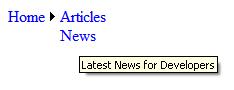
The menu control displays the "Home" at first run. This is the top siteMapNode node in the website.map xml structured file.
When you move the cursor on the menu control, the sub menues automatically opened for display.
Here is the sample web.sitemap file used for the sample.
<?xml version="1.0" encoding="utf-8" ?>

<siteMap xmlns="http://schemas.microsoft.com/AspNet/SiteMap-File-1.0" >

<siteMapNode url="default.aspx" title="Developement" description="Kodyaz
Development Resource Site">

<siteMapNode url="~/articles/articles.aspx" title="Articles" description="Articles
for Developers" />

<siteMapNode url="~/news/news.aspx" title="News" description="Latest News for
Developers" />

</siteMapNode>

</siteMap>
It is important to note that the siteMap element requires only one siteMapNode element inside. For example, you may create the sample web.sitemap file by adding additional siteMapNode elements inside the siteMap which will fail to work.
<?xml version="1.0" encoding="utf-8" ?>

<siteMap xmlns="http://schemas.microsoft.com/AspNet/SiteMap-File-1.0" >

<siteMapNode url="default.aspx" title="Developement" description="Kodyaz
Development Resource Site">

<siteMapNode url="~/articles/articles.aspx" title="Articles" description="Articles
for Developers" />

<siteMapNode url="~/news/news.aspx" title="News" description="Latest News for
Developers" />

</siteMapNode>

<siteMapNode url="about.aspx" title="About us" description="About us"></siteMapNode>

<siteMapNode url="disclaimer.aspx" title="Disclaimer" description="Disclaimer"></siteMapNode>

</siteMap>
This structure in the web.sitemap will cause the following error during runtime during the processing of the following methods
Exactly one <siteMapNode> element is required directly inside the <siteMap> element.
System.Web.XmlSiteMapProvider.BuildSiteMap()

System.Web.XmlSiteMapProvider.get_RootNode()
So it is important to place only one top level siteMapNode between siteMap tags in the site map file web.sitemap.
The recent codes on sample page for demonstrating the usage of Menu control is as:
<%@ Page Language="VB" AutoEventWireup="false" CodeFile="Default.aspx.vb"
Inherits="_Default" %>


<!DOCTYPE html PUBLIC "-//W3C//DTD XHTML 1.0 Transitional//EN"
"http://www.w3.org/TR/xhtml1/DTD/xhtml1-transitional.dtd">


<html xmlns="http://www.w3.org/1999/xhtml" >

<head runat="server">

<title>Untitled Page</title>

</head>

<body>

<form id="form1" runat="server">

<asp:Menu ID="Menu1" runat="server" DataSourceID="SiteMapDataSource1">

</asp:Menu>

<asp:SiteMapDataSource ID="SiteMapDataSource1" runat="server" />

</form>

</body>

</html>