How to Open PopUp_To_Confirm Screen When Delete Function Key is Pressed for Confirmation
In this ABAP tutorial, ABAP developers will find a sample ABAP report which displays a popup confirmation screen when delete function key is pressed.
In the below SAP screenshot, you can see 4 function keys each for Create, Change, Display and Delete.

Function keys are declared using : SELECTION-SCREEN: FUNCTION KEY 1. ABAP code.
Here is the ABAP codes block used for function key declaration.
SELECTION-SCREEN: FUNCTION KEY 1.

SELECTION-SCREEN: FUNCTION KEY 2.

SELECTION-SCREEN: FUNCTION KEY 3.

SELECTION-SCREEN: FUNCTION KEY 4.
The icons and the text of each function key is set using : sscrfields-functxt_01
Here is the ABAP code for text and icon settings of each function key.
For example icon_create is "@0Y@" and maps to create new document icon.
For more information about SAP icons please refer to SAP tutorial Display Icons using ABAP Code - SAP Icon List.
CONCATENATE icon_create text-fc1 INTO gv_button_text. " '@0Y@'

sscrfields-functxt_01 = gv_button_text.
In the ABAP codes section AT SELECTION-SCREEN, the value of ABAP field sscrfields-ucomm is controlled to define which SAP function key is pressed.
In our example to display the delete confirmation screen before deleting the ABAP table record from database table, I used the popup_to_confirm function call code where the sscrfields-ucomm value which stores the returned function key code is "FC04"
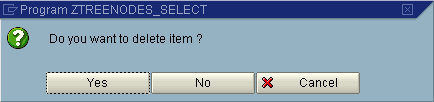
The ABAP function call returns the value of the pressed button at the delete confirm screen.
In order to check which button is pressed on the delete confirm screen, I defined a local variable lv_answer as type c with length 1.
For the above screen shot if the value of the local variable lv_answer is equal to 1 then this means the YES button is clicked.
A value of 2 means NO button is pressed.
And if the value of lv_answer is 3 then the CANCEL button is pressed by the user on the confirm delete screen.
Sample ABAP Code for PopUp_To_Confirm
Here is the ABAP codes of the example ABAP report which uses the Call Function POPUP_TO_CONFIRM for confirming delete operation when DELETE function key is pressed.
*&---------------------------------------------------------------------*

*& Report ZTREENODES_SELECT *

*&---------------------------------------------------------------------*


INCLUDE ztreenodes_select_top . " global Data

INCLUDE ztreenodes_select_cl1 . " local class

INCLUDE ztreenodes_select_o01 . " PBO-Modules

INCLUDE ztreenodes_select_i01 . " PAI-Modules

INCLUDE ztreenodes_select_f01 . " FORM-Routines


TYPE-POOLS : icon.


TABLES : sscrfields. " Fields on selection screens

DATA : gv_button_text(18) TYPE c.


SELECTION-SCREEN BEGIN OF BLOCK b1 WITH FRAME TITLE text-110.

PARAMETERS :

  p_vkorg LIKE vbak-vkorg,

  p_tree LIKE ztrees-treename.

SELECTION-SCREEN END OF BLOCK b1.


* Buttons for action

SELECTION-SCREEN: FUNCTION KEY 1.

SELECTION-SCREEN: FUNCTION KEY 2.

SELECTION-SCREEN: FUNCTION KEY 3.

SELECTION-SCREEN: FUNCTION KEY 4.


START-OF-SELECTION.


END-OF-SELECTION.


INITIALIZATION.


  " Function Keys

  CONCATENATE icon_create text-fc1 INTO gv_button_text. " '@0Y@'

  sscrfields-functxt_01 = gv_button_text.


  CONCATENATE icon_change text-fc2 INTO gv_button_text. " '@0Z@'

  sscrfields-functxt_02 = gv_button_text.


  CONCATENATE icon_display text-fc3 INTO gv_button_text. " '@10@'

  sscrfields-functxt_03 = gv_button_text.


  CONCATENATE icon_delete text-fc4 INTO gv_button_text. " '@11@'

  sscrfields-functxt_04 = gv_button_text.


  sscrfields-functxt_05 = gv_button_text.


AT SELECTION-SCREEN.


  CLEAR gs_ztrees.

  " Control Function Key Return Codes

  CASE sscrfields-ucomm.

    WHEN 'FC01'. " Function Key 1 - CREATE


      gs_ztrees-treename = p_tree.


      CALL SCREEN 50 STARTING AT 10 6 ENDING AT 62 12.


    WHEN 'FC02'. " Function Key 2 - CHANGE


      SELECT SINGLE * FROM ztrees

        INTO gs_ztrees

        WHERE treename = p_tree.


      IF gs_ztrees IS INITIAL.

      ELSE.

        CALL SCREEN 50 STARTING AT 10 6 ENDING AT 62 12.

      ENDIF.


    WHEN 'FC03'. " Function Key 3 - DISPLAY


      SELECT SINGLE * FROM ztrees

        INTO gs_ztrees

        WHERE treename = p_tree.


      IF gs_ztrees IS INITIAL.

      ELSE.

        " TO-DO open Read/Only

        CALL SCREEN 50 STARTING AT 10 6 ENDING AT 62 12.

      ENDIF.


    WHEN 'FC04'. " Function Key 4 - DELETE


      SELECT SINGLE * FROM ztrees

        INTO gs_ztrees

        WHERE treename = p_tree.


      IF gs_ztrees IS INITIAL.

      ELSE.


        DATA : lv_answer(1) TYPE c.


        " Add Confirmation

        CALL FUNCTION 'POPUP_TO_CONFIRM'

          EXPORTING

            text_question = 'Do you want to delete item ?'

            "text-005 " Are you certain...?

          IMPORTING

            answer = lv_answer

          EXCEPTIONS

            text_not_found = 1

            OTHERS = 2.


        IF sy-subrc <> 0. " Function call failed.

          MESSAGE i000 WITH text-006. " Func call failed contact IS

          STOP.

        ENDIF.

        " lv_answer - 1:YES 2:NO 3:CANCEL

        IF lv_answer NE '1'.

          MESSAGE i000 WITH text-007. " Proc cancelled - no update

          STOP.

        ELSEIF lv_answer EQ '1'.

          DELETE FROM ztrees WHERE treeid = gs_ztrees-treeid.

        ENDIF.

        " Confirmation (END)


      ENDIF.


    WHEN OTHERS.

  ENDCASE.