Setup has detected one or more instances of SQL Server 2000 on the computer where you are installing SQL Server 2008.
Yesterday I was trying to install SQL Server 2008 (code name Katmai) July CTP on my laptop where SQL Server 2000 and SQL Server 2005 instances along with SQL Express Edition are installed I got the following error:
Microsoft SQL Server 2008 Setup
Setup has detected one or more instances of SQL Server 2000 on the computer where you are installing SQL Server 2008. SQL Server 2008 installation is not supported side-by-side with SQL Server 2000. You must either install SQL Server 2008 on a different computer or uninstall SQL Server 2000 before installing SQL Server 2008.

Actually this SQL Server 2008 (Katmai) installation error on a computer where SQL Server 2000 is installed is a recognized error message from my prior installation that I wrote my experience on my blog with a title named SQL Server "Katmai" installation is not supported side-by-side with SQL Server 2005 Client Components
But this time I was not sure that I could uninstall the SQL2K components and database instances successfully.
During the uninstallation I leaved shared components (some of the dll files that were said to be shared) and in the warning messages that was written that I can remove those dll files later manually. First I thought that was the reason for the failing installation of Katmai SQL Server edition.
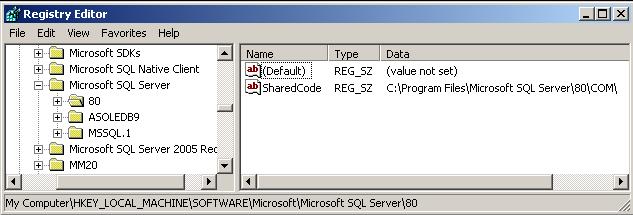
I later realized that the registry entries in the system registry caused this error message that stopped SQL Server 2008 (aka Katmai) July CTP installation.
After deleting the registry key "My Computer\HKEY_LOCAL_MACHINE\SOFTWARE\Microsoft\Microsoft SQL Server\80" shown in the below screenshot, and running the SQL 2008 server setup once more, I could successfully complete the SQL2K8 installation.