
What is new in SQL Server 2008? MERGE T-SQL command enhancement
SQL Merge in SQL Server 2008 is one of the T-SQL improvements introduced to SQL programmers with SQL Server 2008.
MERGE T-SQL command is being used since SQL Server 2008 CTP (Community Technology Preview) in June 2007 by Microsoft.
By using the Merge command T-SQL developers can compare two tables and update matched ones, or insert unmatched rows from one into other, or delete unmatched ones from the primary table at the same time using single SQL statement.
Here, you can find a sample which you can run on a SQL Server 2008 database to view the results of MERGE command.
Start first creating sample tables which we will use and compare data in the MERGE T-SQL command syntax.
CREATE TABLE ExistingData (

 id int,

 characters nvarchar(50)

)

GO


CREATE TABLE NewData (

 id int,

 newcharacters nvarchar(50)

)

GO


INSERT INTO NewData VALUES (1, 'Darth Vader'), (2, 'Commander Bakara')

GO
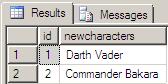 This is the NewData table with its rows
Then if you run the below Merge query, you will see that all the records in the new table or staging table is inserted to the primary table since it is empty. Because there is not any rows in the primary table, there is no match so insert statement runs in this situation
|
With Microsoft SQL Server 2008 Release Candiadate RC0, the MERGE T-SQL command statement has been updated. Before MS SQL Server 2008 RC0, the Merge T-SQL statement was implemented as shown below for our sample:
WHEN TARGET NOT MATCHED THEN INSERT VALUES (id, NewCharacters)
With, the change in SQL MERGE command syntax, the above Merge sql codes has been throwing the following sql error messages:
Msg 102, Level 15, State 1, Line 10
Please, correct your SQL code blocks if you are getting similar errors, by changing the : WHEN TARGET NOT MATCHED with WHEN NOT MATCHED BY TARGET WHEN SOURCE NOT MATCHED with WHEN NOT MATCHED BY SOURCE |
MERGE ExistingData

USING

(

SELECT

 id,

 newcharacters

FROM NewData

) NewData ON ExistingData.id = NewData.id

WHENMATCHED THEN UPDATE SET ExistingData.Characters = NewData.NewCharacters

WHENNOT MATCHED BY TARGET THEN INSERT VALUES (id, NewCharacters)

WHENNOTMATCHED BY SOURCE THEN DELETE;

GO
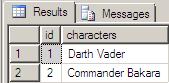 This is the ExistsingData table with its rows
Let's change the data now on both tables and run the Merge t-sql command to see what happens now.
UPDATE NewData

SET NewCharacters = N'Commander Thire'

WHERE id = 2

INSERT INTO NewData VALUES(3, N'Stass Allie'), (4, N'Chewbacca')

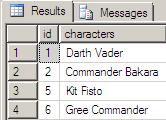
INSERT INTO ExistingData VALUES(5, N'Kit Fisto'), (6, N'Gree Commander')
 |
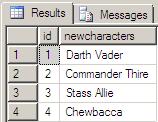 |
| ExistingData table | NewData table |
What we are expecting now is updating the primary table values with the secondary table values where the id's of both side match. So, we can expect an update on the ExistingData table at row with id equals to 2. So Commander Thire will replace Commander Bakara
Also we can expect that the merge statement will cause new records in the primary table where id's of the secondary table does not exists among the id's of the primary table. So in the NewData table rows with id is 3 and 4 will be inserted into the primary table ExistingData during the merge process.
Last part of the Merge command is where SOURCE NOT MATCHED portion. Here the DELETE command will cause the rows with 5, and 6 will be deleted from the primary table.
So, in short, to execute MERGE command as shown above will create a copy of the secondary table on primary table. Let's run and see the results.
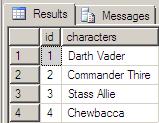 As you see the ExistingData table has been altered as shown aside.
If we rerun the last step, last MERGE command commenting the line SOURCE NOT MATCHED then we can prevent deleting unmatched rows in the primary table. This way, we can merge records or new rows from the secondary table and update matched ones with new definitions but also keep the existing data in the primary table which is now coexisting in the secondary one. Here is the MERGE command to succeed this task:
MERGE ExistingData

USING

(

SELECT

 id,

 newcharacters

FROM NewData

) NewData ON ExistingData.id = NewData.id

WHEN MATCHED THEN UPDATE SET ExistingData.Characters = NewData.NewCharacters

WHEN NOT MATCHED BY TARGET THEN INSERT VALUES(id, NewCharacters);

--WHEN NOT MATCHED BY SOURCE THEN DELETE;

GO
And here is the result of the above Merge statement on the ExistingData table, or the primary table.
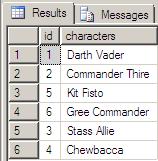
One more small note on MERGE T-SQL command syntax, do not forget to end the MERGE command code block by a semi-colon ";", otherwise the SQL Server Database Engine will throw the following error message:
Msg 10713, Level 15, State 1, Line 11

A MERGE statement must be terminated by a semi-colon (;).
For t-sql developers looking for more Merge examples, you can work on the merge syntax and on the sql Merge example code at SQL Server 2008 T-SQL MERGE Statement Example and at SQL Merge with Trigger for Summary Table Maintenance.