
SQL Server 2005 Full-Text Search Indexing
Microsoft SQL Server with support of T-SQL can search for matches of a value in the given data. For example, if in a database table with a column named Notes you can search records which contain the expression "Full-Text Search" or the Notes field is equal to "SQL Server 2005" using similar sql queries shown below:
SELECT * FROM NotesTable WHERE Notes Like '%Full-Text Search%'


SELECT * FROM NotesTable WHERE Notes = 'SQL Server 2005'
T-SQL is very helpful if you exactly know what you are looking for. As an example, if you are seaching for a product in products table, you can use the ProductCode field in your sql search command with an exact match:
SELECT * FROM Products WHERE ProductCode = 'SQL2005EE'
But t-sql does not give desired results every time.
SELECT * FROM NotesTable WHERE Notes Like '%Full-Text Search%'
The above query will not list the "Full-Text Index Search" since it has the Index in it. Or even if you have double space character with in your database column, it will not be listed either.
You may implement your search query altering the original one like :
SELECT * FROM NotesTable WHERE Notes Like '%Full%Text%Search%'
But one more critical point for T-SQL search queries is the exact order of your expression is also sought with in the searched fields. If your table has a record "Searches using Full-Text Indexing", you must now use a sql query like below which is I believe will not be implemented in real life.
SELECT * FROM NotesTable WHERE Notes Like '%Full%Text%Search%'

OR Notes Like '%Search%Full%Text%'

OR ...
Ok, it is not an advanced query or well structured, but is it fast enough to keep up with impatient users? This is an indexing problem. Classic indexing methods used on sql server databases will use indexes if you have a search like
SELECT * FROM NotesTable WHERE Notes Like 'Full Text Search%'
This means get records whose column Notes begins with the expression 'Full Text Search' and goes on.
But indexes on the Notes field will not be helpful if you search records that contains the 'Full Text Search' in Notes field.
SELECT * FROM NotesTable WHERE Notes Like '%Full Text Search%'
As a result a search like above will result with a full table scan. I'm sure you will not want this on a table whose size is a few gigabytes.
Actually, in real world applications, things are not clear. For a live example, perhaps you have made a search on Full-Text Search in a search engine. For every expression you have written in the search box field, you get different sets of results. But which worlds helped you to find the best results you were looking for?
This sample case can be applied in SQL Server databases too. You may want to search for a set of expressions in your database fields. But you also want your search wise and also the search should be completed as quick as possible.
In short, t-sql does not really supply developers strong and efficient tools for searching.
Microsoft SQL Server 2000 has also full-text search capabilities. SQL Server 2005 (aka Yukon) has some improved features and some new features when compared with SQL Server 2000.
Microsoft SQL Server 2005 now has the side-by-side installation of the full-text engine. For each instance of Microsoft SQL Server 2005, one instance of Microsoft Full-Text Engine for SQL Server (MSFTESQL) service based on the Microsoft Search (MSSearch) service is installed. This new installation method enables the SQL Server 2005 keep the MSSearch service only for its use and do not share MSSearch Service with other server products that use the MSSearch service.
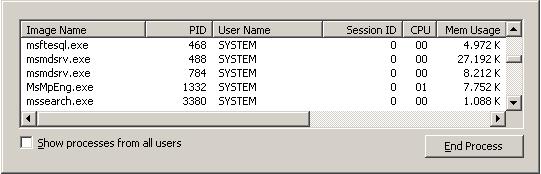
If you open the Windows Task Manager you can notice that there is a running msftesql.exe service and mssearch.exe service.
The msftesql.exe can be controlled from Services Management Console. You can see the SQL Server FullText Search service installed for the SQL Server 2005 named instance YUKON.

The description of the service in the service properties box is as "Quickly creates full-text indexes on content and properties of structured and semi-structured data to allow fast linguistic searches on this data."
Also the path of the executable application with required parameters for the service is given as:
"C:\Program Files\Microsoft SQL Server\MSSQL.2\MSSQL\Binn\msftesql.exe" -s:MSSQL.2 -f:YUKON
http://msdn2.microsoft.com/en-us/library/ms142490.aspx
In order to get benefits of Full-Text Search, first we must create a full-text catalog in order to store full-text indexes. And then create full-text indexes with in this catalog on target MS SQL Server 2005 instance.
Open the Microsoft SQL Server Management Studio and connect to the SQL Server 2005 database instance you want to setup the fulltext catalog.
Run the below CREATE FULLTEXT CATALOG sql command on the query editor screen.
CREATE FULLTEXT CATALOG KodyazFTCatalog
If the Full-Text search is not enabled for the database, you will get the following error message:
Msg 7616, Level 16, State 100, Line 1

Full-Text Search is not enabled for the current database. Use sp_fulltext_database
to enable full-text search for the database. The functionality to disable and
enable full-text search for a database is deprecated. Please change your
application.
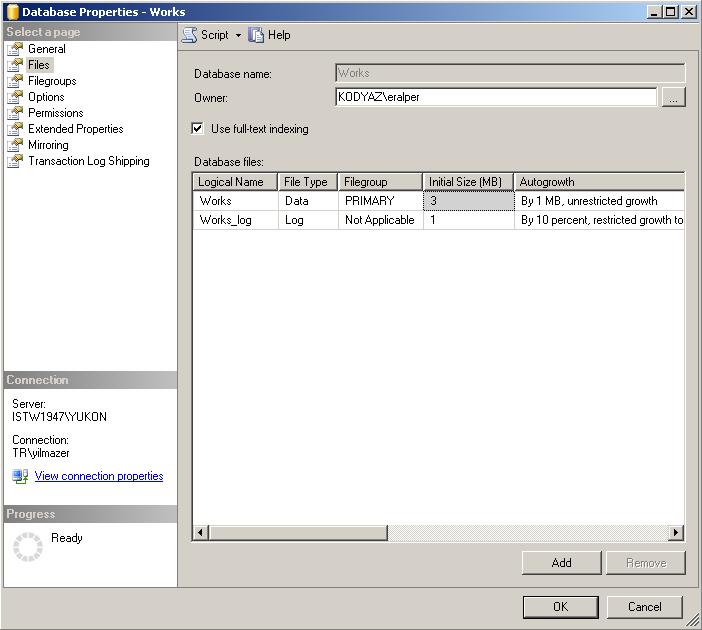
In order to see whether Full-Text search is enabled or not, you can open the database properties screen for the target SQL Server 2005 database, then select the Files page. You will see the "Use full-text indexing" checkbox for enabling or disabling the full-text search on this database.
If the full-text search is enabled for the database, the below command will result notifying the message "Command(s) completed successfully."
CREATE FULLTEXT CATALOG KodyazFTCatalog
With a successfull complete of the CREATE FULLTEXT CATALOG command a folder named same as new catalog name is created on default folder C:\Program Files\Microsoft SQL Server\MSSQL.2\MSSQL\FTData to store catalog and index data.
If you wonder the CREATE FULLTEXT CATALOG syntax and additional parameters you can read the SQL Server 2005 Books Online (BOL) topic at http://msdn2.microsoft.com/en-us/library/ms189520.aspx
CREATE FULLTEXT CATALOG catalog_name

[ON FILEGROUP filegroup ]

[IN PATH 'rootpath']

[WITH <catalog_option>]

[AS DEFAULT]

[AUTHORIZATION owner_name ]


<catalog_option>::=

ACCENT_SENSITIVITY = {ON|OFF}
You can also enable or disable Full-Text indexing on a database by using system stored procedures commands.
exec sp_fulltext_database 'enable'


exec sp_fulltext_database 'disable'
The procedure sp_fulltext_database takes the parameter @action with valid values 'enable' and 'disable' on the current database.
If you wonder the details for procedure sp_fulltext_database simply run "sp_helptext sp_fulltext_database" to see the sql codes for the procedure.
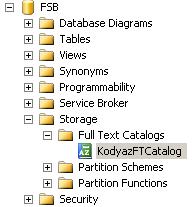
After we have enabled the full-text indexing and created our first fulltext catalog, you can view the newly created objects using the Object Explorer window of the Microsoft SQL Server Management Studio. Drill down the database tracking the path Storage > Full Text Catalogs. You can see that the new catalog we have just created is listed under the Full Text Catalogs.
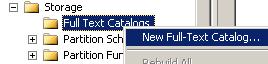
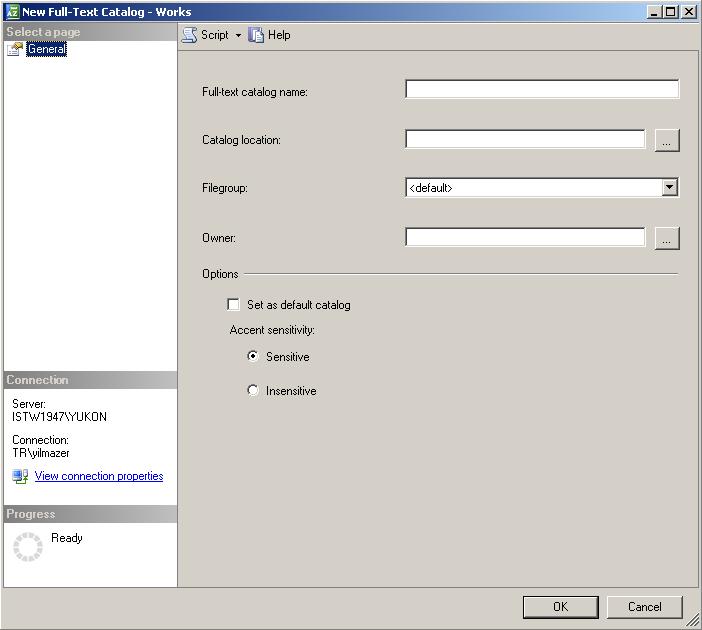
We can also use the SQL Server Management Studio in order to create and configure our Full-Text Catalogs. On the context menu of the Full Text Catalogs, there is the New Full-Text Catalog... command.
This option displays the New Full-Text Catalog dialog screen shown as below. From this screen we can set the catalog name as well as the catalog location and other configuration options.
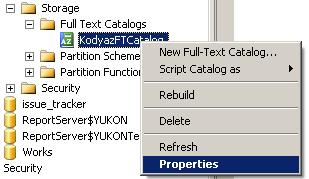
If you open the context menu on the full text catalog, you will see a list of commands and the Properties option
If you open the properties screen for an existing Full Text catalog, if you get the following error message, check that the full-text indexing property is set to diabled by fault. Or there may not be a defined population schedule for the full-text catalog.
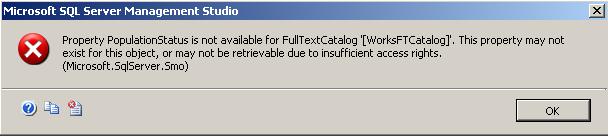
Property PopulationStatus is not available for FullTextCatalog '[WorksFTCatalog]'.
This property may not exist for this object, or may not be retrievable due to
insufficient access rights. (Microsoft.SqlServer.Smo)
After creating a Full-Text catalog, now we are ready to create full-text indexes. Before creating a full-text index on a table we should be sure that there is a unique, single column, non nullable index on the related table. This index will be used to map the results to the records of the table.
By running the below sql command CREATE FULLTEXT INDEX we can create our first fulltext index.
CREATE FULLTEXT INDEX ON Complaints

(

ComplaintDetails

)

KEY INDEX PK_Complaints ON SampleFTCatalog

WITH CHANGE_TRACKING AUTO
You see that giving the table name and the column for indexing with the table index and the full text catalog name is enough to create the full-text index.
For a full list of options on CREATE FULLTEXT INDEX command check the BOL topic at http://msdn2.microsoft.com/en-us/library/ms187317.aspx
CREATE FULLTEXT INDEX ON table_name

[(column_name [TYPE COLUMN type_column_name]

[LANGUAGE language_term] [,...n])]

KEY INDEX index_name

[ON fulltext_catalog_name]

[WITH

{CHANGE_TRACKING {MANUAL | AUTO | OFF [, NO POPULATION]}}

]
If you wonder what is the indexing status of the full-text catalog, you can run the below query using FULLTEXTCATALOGPROPERTY
SELECT FULLTEXTCATALOGPROPERTY('SampleFTCatalog', 'Populatestatus')
If the return value is 0 then this means indexing is not running and the population status is idle. But a return value of 1 for FULLTEXTCATALOGPROPERTY means indexing process is currently running on the full-text catalog and the population status is "populating catalog".
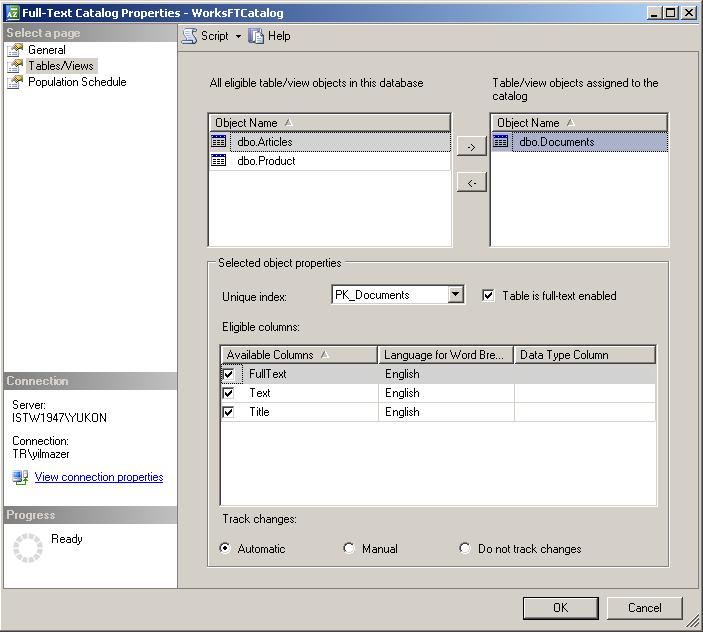
You see in the below screenshot, a list of tables on the right that are assigned to the full-text catalog WorksFTCatalog. For the selected table unique index and available columns for full-text index and selected columns are listed.
Running Full-Text Search Queries
For samples on full-text search, I created a table named Documents.
CREATE TABLE Documents(

[DocumentId] [int] IDENTITY(1,1) NOT NULL,

[Title] [nvarchar](1000) NOT NULL,

[Text] [nvarchar](max) NULL,

[FullText] [ntext] NULL,


CONSTRAINT PK_Documents PRIMARY KEY CLUSTERED

(

[DocumentId] ASC

)


)
Then I created the full-text catalog named WorksFTCatalog
CREATE FULLTEXT CATALOG WorksFTCatalog
I enabled the fulltext indexing by running the sp_fulltext_database
exec sp_fulltext_database 'enable'
Then I created the full-text index on table Documents
CREATE FULLTEXT INDEX ON Documents

(

Title,

[Text],

[FullText]

)

KEY INDEX PK_Documents ON WorksFTCatalog

WITH CHANGE_TRACKING AUTO
Creating the fulltext index will return a warning message:
Warning: Table or indexed view 'Documents' has full-text indexed columns that are of type image, text, or ntext. Full-text change tracking cannot track WRITETEXT or UPDATETEXT operations performed on these columns.
After the population status is set to idle after the indexing has finished by running the below FULLTEXTCATALOGPROPERTY select query,
SELECT FULLTEXTCATALOGPROPERTY('WorksFTCatalog', 'Populatestatus')
We can now run our first search query on the documents table.
CONTAINS
SELECT * FROM Documents WHERE CONTAINS(Text, N'songs')
This query will return me rows that the [Text] columns containing the word "songs".
But when I run "SELECT * FROM Documents WHERE CONTAINS(Text, N'song')", this query will return me no rows. Since the [Text] column values does not contain the word "song" but contains the word "songs"
If you wish to search for more than one words you can use OR. But the syntax changes a little bit: N' "songs" OR "song" '
SELECT * FROM Documents WHERE CONTAINS(Text, N' "songs" OR "song" ');
The character "*" can be used for zero or more any characters. So I can get any words with containing "song" in it.
SELECT * FROM Documents WHERE CONTAINS(Text, N' "song*" ');
The below sample query will search for all rows where Text column contains words of the form "song", like "songs", etc.
SELECT * FROM Documents

WHERE CONTAINS(Text, N' FORMSOF (INFLECTIONAL, song) ');
FREETEXT
The following query will find the given search criterias in a text "By alerting you to potentially unsafe attachments, ...". This query will search for all rows containing the words related with ones in the search terms.
SELECT * FROM Documents

WHERE FREETEXT(Text, N'safe potential attachment');
CONTAINSTABLE
CONTAINSTABLE has the functionality of ranking within our searches.
SELECT *

FROM Documents

INNER JOIN CONTAINSTABLE(Documents, [Text], 'songs') AS KEY_TBL

ON Documents.DocumentId = KEY_TBL.[KEY]
Running the above query returned the following results on my Documents table.

The last two columns in the result set that are named as "KEY" and "RANK" are from ContainsTable command table KEY_TBL
Key is the primary key value on the Documents table. And Rank is the search rank for the search term in the related row. Run the ContainsTable part alone.
SELECT * FROM CONTAINSTABLE(Documents, [Text], 'songs') AS KEY_TBL