
SQL Server administration and T-SQL development, Web Programming with ASP.NET, HTML5 and Javascript, Windows Phone 8 app development, SAP Smartforms and ABAP Programming, Windows 7, Visual Studio and MS Office software Kodyaz Development Resources
Development resources, articles, tutorials, samples, codes and tools for .Net, SQL Server, Vista, etc.


Unsupported Browser Message for IE6 while browsing with Internet Explorer 8

Web users report Unsupported Browser message for "Internet Explorer 6" (IE6) when they visit a web page using Internet Explorer 8 web browser. This is interesting that the web site cannot identify the web browser version correctly.

One of my friends has experienced this "unsupported browser for IE6" problem recently. We have checked a few web sites that check browser version online from the request header. Although these web sites indicate that the web browser he uses is Internet Explorer 8, a banking website and SAP SCN portal still insist that his web browser is Internet Explorer 6. One interesting note, I'm also using IE8 and the same web sites correctly identify my web browser type and the web browser version without any warning.

I also checked my web browser's http requests when I request a web page from the SAP SCN portal using Fiddler HTTP Request analyze tool. I could see that the internet browser is sending requests with user-agent information indicating that the browser type and version is Internet Explorer 8 within the request header. You can also analyze HTTP requests sent by your web browser when you visit a web page by using any of the tools to analyze HTTP requests and responses listed in the given reference page.

Later he came with a solution for the "unsupported browser message" on SCN web portal. He wanted me to check a registry entry on my computer. I launch "Regedit" registry editor tool and drill through the following path in the registry records.
My Computer > HKEY_CURRENT_USER > Software > Microsoft > Windows > CurrentVersion > Internet Settings > User Agent > Post Platform
I had an empty registry key but he had some value with that key. That is absolutely because of browser upgrade and then unsinstallation of IE8 and reinstallation of IE6 steps. Since he has repeated browser upgrade a few times, "Post Platform" registry key has some text including IE6 within the registry value.

When he cleared the value associated with the Internet Settings > User Agent > Post Platform Default key, he was able to solve "unsupported browser message".
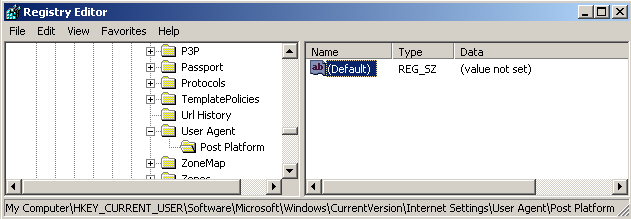
clear unsupported browser message with registry key

My Computer > HKEY_CURRENT_USER > Software > Microsoft > Windows > CurrentVersion > Internet Settings > User Agent > Post Platform


Follow Kodyaz on Twitter

Windows 7

Windows 7 Articles

Windows 7 Forums

Windows 7 Blog

Windows 7 Screenshots


Windows Phone 7

Windows Phone 7 Apps

Microsoft My Phone


Windows 8 Phones

Nokia Lumia 920


Microsoft Windows 7 (Windows Seven) Articles

How to Enable Windows 7 Gadgets
Add Folder to Windows 7 Favorites Folder using Windows Explorer
How to Rotate Screen in Windows 7
How to Change Default Browser in Windows 7
Windows 7 Magnifier Software (Computer Screen Magnifier)
Download Internet Explorer 10 for Windows 7
Internet Explorer 9 Requirements - IE9 Requirements
How to Check Windows Version using System Information
Top Windows Phone 7 Apps List: All One Needs to Know
How to Check Windows PowerShell Version Installed on a Computer
Enable IE Quick Tabs - Internet Explorer 9
How to Check Windows 7 Version Number with Service Pack
What is New in Internet Explorer 9 - IE9 Features
Free Windows 7 Service Pack 1 Download (Windows 7 SP1)
Free Download Internet Explorer 9 RC - IE9 RC Download
Windows Phone Programming in C# : Free Download eBook for Windows Phone Developers
What is Microsoft Windows 7 Credential Manager
Microsoft Windows 7 AppLocker Tool Step by Step
Windows 7 Taskbar and Windows 7 Pin to Taskbar Feature
Shuffle Wallpaper Pictures Instead of Windows 7 Dreamscene
Windows 7 Iso Image Burner - Windows Disc Image Burner
Windows 7 Location-aware Printing
Windows 7 Tools - Windows Search Tools, Windows 7 Search Options
What is Windows Phone 7
Microsoft My Phone
Microsoft Windows 7 Requirements for Installation
Windows Backup using Windows 7 Backup Software
Windows 7 Task Scheduler as Windows Task Scheduling Software
How to Change Windows 7 Language using Windows 7 Language Pack
Windows 7 Libraries: How to Create and Manage a Windows 7 Library
Programming Windows Phone 7 : Free Download eBook from Microsoft Press
How to Uninstall Internet Explorer 9 - IE9 Removal
Windows Internet Explorer 9 - IE9 Download Links and IE9 Installation
How Many Times Can I Activate Windows 7 - Windows 7 Activation Count
Windows 7 Activation - This copy of Windows 7 is not genuine
How to Turn On Games on Windows 7
Windows 7 Touch Screen Software and Compatible Applications
Approved Multi-Touch Screen Monitors for Windows 7
First Windows Touch Screen Operating System with Microsoft Windows 7 Multi-Touch Features
How To Download, Install And Enable Windows 7 DreamScene Animated Background
Microsoft Visual Studio 2008 Installation on Windows 7 - Installing VS2008 SP1
How to Change Windows 7 Logon Screen Background using Registry for Screen Wallpaper at Oobe folder
How to Install Internet Information Services (IIS 7) on Windows 7 Ultimate
Install SQL Server 2008 on Windows 7 Requirements
Windows 7 Activation Error - A problem occured when Windows tried to active. Error Code 0x80072F8F.
Free Windows 7 Trial Download - Download Windows 7 Enterprise Edition 90 Days Trial Version
New Windows 7 BitLocker Tool "BitLocker to Go" and BitLocker Password Recovery
Top 4 Reasons for Migrating to Windows 7 from Windows XP
Games on Windows 7 - Games for Win7 Gamers
Windows 7 How To Tips and Tricks
Microsoft Windows 7 Upgrade Advisor Beta Program Download
Edit cversion.ini File to Upgrade Windows 7 RTM Version from Windows 7 RC
Windows 7 Ultimate Edition Installation Screenshots (X86 RTM Build 7600)
Windows 7 Ultimate Installation (X64 RTM Edition Build 7600) Screenshots Step by Step
Download Microsoft Touch Pack for Windows 7
Microsoft Surface Lagoon for Windows 7
How to Delete and Remove the Windows.old Folder
How to Activate Windows 7 Manually - Windows 7 Activation Steps
How To Activate Windows 7 by Phone Step-by-Step Guide
Windows 7 RC (Release Candidate) (Build 7100) Step by Step Installation on Virtual PC with Screenshots
Windows 7 Installation Notes for Exam 70-680 Windows 7, Configuring
How to Remove or Disable Send Feedback Button in Windows 7 Beta
How to use Problem Steps Recorder Tool in Windows 7
Register for Win7 MCTS Beta Exam 71-680: TS: Windows 7, Configuring


Copyright © 2004 - 2013 Eralper Yilmaz. All rights reserved.
Community Server by Telligent Systems