
Reason 1815 : File activation failure during SQL Server 2008 Create Database For Attach command without .ldf log file
"FOR ATTACH" or "FOR ATTACH_REBUILD_LOG" the following Create Database command used in order to attach an .mdf file fails with the following error messages.
USE [master]

GO


CREATE DATABASE [MyWorks] ON

( FILENAME = N'C:\SQLDatabases\MyWorks.mdf' )

FOR ATTACH_REBUILD_LOG;


GO
File activation failure. The physical file name "C:\SQLDatabases\MyWorks_log.ldf" may be incorrect.
Msg 5123, Level 16, State 1, Line 2
CREATE FILE encountered operating system error 5(failed to retrieve text for this error. Reason: 1815) while attempting to open or create the physical file 'C:\SQLDatabases\MyWorks_log.LDF'.
Msg 1813, Level 16, State 2, Line 2
Could not open new database 'MyWorks'. CREATE DATABASE is aborted.
No matter whether you use the "sp_attach_single_file_db" stored procedure for attaching only the .mdf data file without the .ldf log files, the same error is thrown by the SQL Server 2008 SQL Engine.
sp_attach_single_file_db @dbname= 'MyWorks', @physname= 'C:\SQLDatabases\MyWorks.mdf'
File activation failure. The physical file name "C:\SQLDatabases\MyWorks_log.ldf" may be incorrect.
Msg 5123, Level 16, State 1, Line 1
CREATE FILE encountered operating system error 5(failed to retrieve text for this error. Reason: 1815) while attempting to open or create the physical file 'C:\SQLDatabases\MyWorks_log.LDF'.
Msg 1813, Level 16, State 2, Line 1
Could not open new database 'MyWorks'. CREATE DATABASE is aborted.
I realized that if I place the .mdf file on the default MS SQL Server 2008 Data folders, this exception does not occur.
C:\Program Files\Microsoft SQL Server\MSSQL10.MSSQLSERVER\MSSQL\DATA
So I suspected from an access security issue.
So how we can resolve this problem.
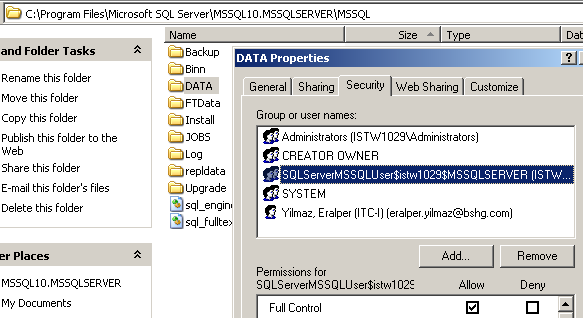
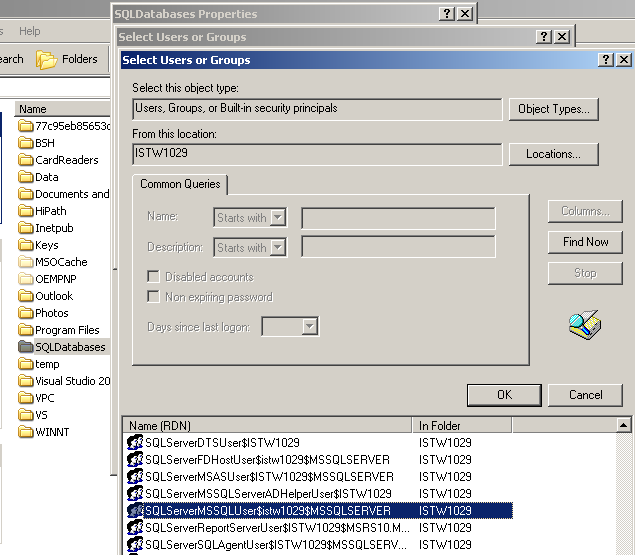
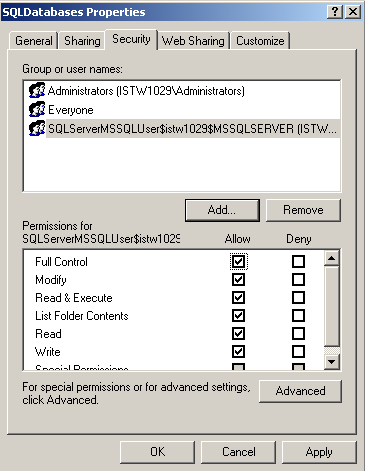
Here is the user that I should think about and copy permissions on the new data folder: ISTW1029\SQLServerMSSQLUser$istw1029$MSSQLSERVER
USE [master]

GO

CREATE DATABASE [MyWorks] ON

( FILENAME = N'C:\SQLDatabases\MyWorks.mdf' )

FOR ATTACH_REBUILD_LOG;


GO
File activation failure. The physical file name "C:\SQLDatabases\MyWorks_log.ldf" may be incorrect.
New log file 'C:\SQLDatabases\MyWorks_log.LDF' was created.